 Dubai:
 :
: 

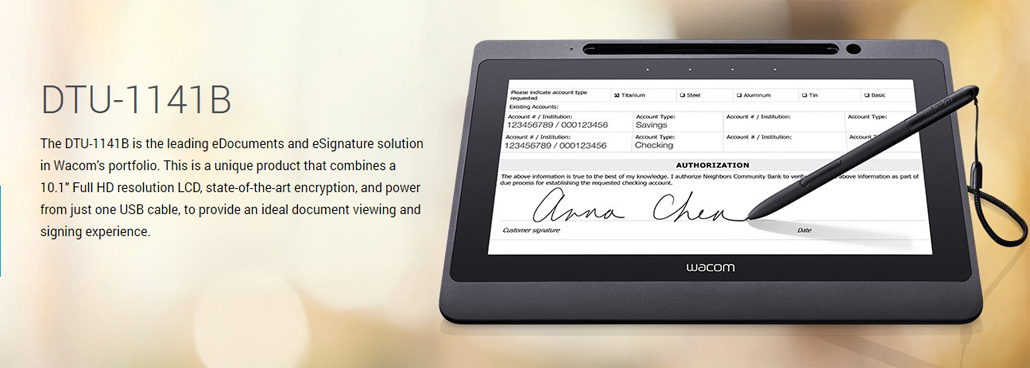
Wacom DTU-1141B
Wacom DTU-1141B eSignature Solution
The Wacom DTU-1141B is the leading eDocuments Sign / eSignature Solution in Wacom’s Portfolio. This DTU-1141B is unique Product that combines a 10.1″ Full HD with featuring Electronic Handwritten Signature with Software Solutions.
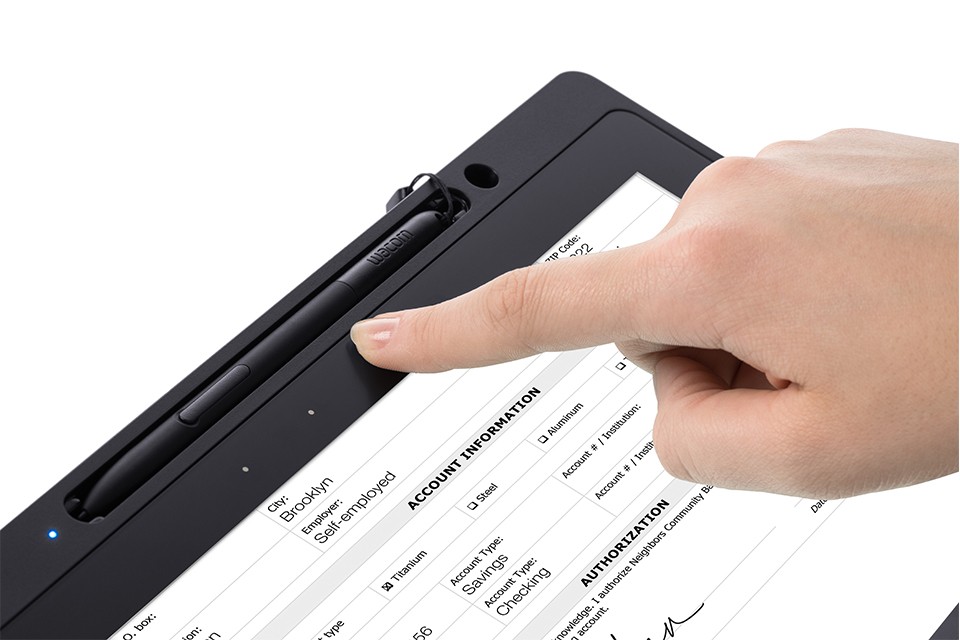
DTU-1141B : Price – 1925.00 AED
The DTU-1141B is Wacom’s premium product that is specifically designed for viewing and signing electronic documents directly on screen. The signature pads have got huge popularity in last two years. The leading ecommerce businesses are providing the signature pads to their salesperson. Customers purchase products, get delivered on time and then provide their signatures on signature pads to verify the delivery of product. Wacom DTU-1141 signature display is one of the most used signature displays across the world. Now we are supplying it in the Middle-East. Various companies have communicated with us to reveal more about Wacom’s products. We ensure them about supplying clutter-free signature displays like Wacom DTU-1141 graphic tablet, which comprise only one USB cable for charging.
Wacom Display Pen Tablet DTU-1141
is a hardened signature pad, which comprises an anti-glare display. Your salespersons can easily operate it in a bright day and view all the details given in the document. Whatever kind of lighting is available, DTU-1141 would be easy to use. You will capture the perfect signature of the clients, which he can review after making his signature. DTU-1141 makes you feel like you are making a sign on a paper. That’s what the biggest advantage of using this signature pad. Several business organizations in the UAE have ordered DTU-1141 and today they are using on a daily basis.
Wacom DTU-1141B eSignature Solution Display – features and benefits
- 10.1” color LCD panel with Full HD (1920×1080) resolution to view and sign documents
Support for 6 different resolutions from 800×600 to 1920×1080
Patented cordless, battery-free pen with 1024 levels of pressure sensitivity for the best signing and writing experience
State-of-the-art RSA/AES encryption to perform secure transactions
Power is provided from just one USB cable to reduce clutter in any working environment
Hardened, anti-glare surface provides high durability and easier viewing in different lighting conditions, plus a superb paper-like feel
VESA mounting holes allow for use of third party arms and stands
The DTU-1141B has all the features necessary for a best-in-class eDocuments solution. The vivid 10.1″ LCD supports multiple resolutions up to Full HD to provide a great experience with any business software application. For security, the DTU-1141B includes state-of-the-art encryption, plus unique hardware ID to identify the individual unit that was used for signing. Four touch-activated ExpressKeys allow easy access to commonly used shortcuts.As with all Wacom products, the DTU-1141B is extremely durable and can be easily integrated into any existing environment. The pen is cordless and battery-free, making it light and strong. The unit can be used while flat, supported at a comfortable angle with the integrated stand, or attached to a 3rd party arm or stand with the VESA mount. Please contact us for more information about how the DTU-1141B can fit into your workflow.
It is the best in class:
Wacom DTU-1141 has proven time and again that it is the best signature pad in this class. It has all the necessary features that you may require to capture top-class signatures. It offers top-class eDocument solutions with its 10.6” screen. Multiple resolutions and a pressure sensitive pen with no cord improve the signature quality. Wacom has prepared it by applying the latest technique and the developers have added all the necessary programs in this tab to improve its functionality. eTop Solution is the leading supplier of DTU-1141. You can place the order now and we will deliver it within two days.
This is one of the most common decisions businesses face when looking at Wacom’s signing display range, and the answer usually comes down to two things: how much counter space you have and what you need the customer to actually do on the device.
The DTU-1031AX has a 10.3-inch display and a slightly different connectivity setup — it is a solid choice for environments where the signing session is relatively quick and the document does not need to be read in full before signing. It is compact, efficient, and gets the job done at counters where throughput matters more than document presentation.
The DTU-1141B has a 10.1-inch Full HD IPS screen — and while the size difference sounds small, the IPS panel makes a real difference in how the display looks from an angle. When a customer is leaning in to read a document, the IPS technology means the colors and contrast stay accurate regardless of viewing position. For environments where customers are actually reading contracts, consent forms, or multi-page agreements on screen, this matters.
The DTU-1141B also has four touch-activated ExpressKeys on the bezel, VESA mounting support, and the ability to display promotional content when idle — making it the more versatile long-term investment for customer-facing counters.
If your primary need is fast, high-volume signature capture on short documents, the DTU-1031AX works well. If you need customers to genuinely engage with document content before signing, the DTU-1141B is the right fit.
How the Pen Works — and Why It Never Needs Charging
The pen that comes with the DTU-1141B is one of the quieter selling points of the device, but it is one of the most practical things about it in a daily business environment.
It uses electromagnetic resonance technology — the tablet surface emits a low-level electromagnetic field, and the pen draws energy from that field to power itself. There is no battery inside the pen, no charging cable, no wireless pairing, and no situation where a customer picks up the pen and nothing happens because it ran out of power overnight.
For a device that sits at a counter and gets used dozens of times a day by different people, this is genuinely important. Battery-powered styluses fail at inconvenient moments. EMR pens simply work, every time.
The pen also has 1024 levels of pressure sensitivity, which means it captures how hard the person is pressing as they write. This pressure data is part of the biometric signature profile — it contributes to making each signature uniquely traceable to the individual who created it, rather than just being a visual image that could theoretically be copied.
Over time, the pen nib — the small tip that contacts the glass — will wear slightly with heavy use. Replacement nibs are included in the box (five are provided), and changing one takes about ten seconds using the nib removal tool that is also included. This is the only maintenance the pen ever needs.
What Biometric Signature Data Actually Means for Your Business
The term “biometric signature” appears on a lot of product pages and rarely gets properly explained. Here is what it actually means in practice and why it matters when a signature gets challenged.
When someone signs on the DTU-1141B, the device records more than the shape of the signature. It records the sequence of strokes — the order in which each line was drawn. It records the pressure applied at every single point along every stroke, 200 times per second. It records the speed at which the pen moved, where it lifted off the surface, and where it came back down.
All of this is captured in the background and stored with the signed document as a data layer that is invisible to the person signing. The visual signature is what the customer sees and recognizes. The biometric layer is what makes that signature verifiable.
If a signature is ever disputed — a customer claims they never signed something, or someone claims a signature was forged — the biometric data gives you something a scanned wet-ink signature can never provide: a behavioral record of the signing act itself. Forensic document examiners can analyze this data against a known reference signature from the same individual and make a qualified comparison.
For businesses in regulated industries across the Middle East — where document integrity is tied to compliance obligations — this is the layer of protection that makes electronic signatures genuinely robust rather than just convenient.
Running the DTU-1141B in a Kiosk or Embedded Counter Setup
Most deployments start with the DTU-1141B sitting on a desk using the integrated stand. That works well and covers the majority of use cases. But a number of businesses across the Middle East — particularly those building dedicated signing stations or modernizing service counters — take the setup further.
The VESA 75mm mounting holes on the back of the unit allow it to attach to standard monitor arms, wall mounts, and custom desk brackets. For counters where space is limited, mounting the DTU-1141B on an arm means it can swing toward the customer for signing and swing back toward staff for workflow management between sessions.
For fully embedded installations — where the device sits flush inside a cut-out in the counter surface — the flat glass front and thin 11mm profile (excluding the stand foot) make this achievable with standard fabrication work. The single USB cable running underneath the counter keeps the surface completely clean with no visible cable management.
For kiosk setups where the device needs to operate semi-unattended, the Kensington Security Slot on the unit allows a physical lock to prevent theft — and the pen tether keeps the pen attached to the unit so it is always available for the next user.
This flexibility is what makes the DTU-1141B work as well in a custom-built self-service terminal as it does on a standard bank counter desk.
Common DTU-1141B Issues and How to Fix Them
Most problems people encounter with the DTU-1141B fall into a small number of categories, and most of them have straightforward solutions.
The screen is not detected after connecting. This almost always means the DisplayLink driver is either missing or was installed after the Wacom driver. Disconnect the device, uninstall both drivers, reinstall DisplayLink first, then Wacom, restart fully, then reconnect.
The pen is not responding or has an offset. An offset — where the cursor appears in a different place from where the pen tip actually touches — is typically a calibration issue. Open Wacom Tablet Properties and run the calibration tool. If the offset persists after calibration, check whether the display resolution in your system settings matches one of the six supported resolutions (800×600 up to 1920×1080).
The device works on one computer but not another. The DTU-1141B requires both drivers on every computer it connects to. Moving it between machines without installing the drivers on the second machine is the most common cause of this. Both drivers need to be present on whichever computer the device is connected to.
The screen goes dark after a period of inactivity. This is the device entering sleep mode at 1W power consumption — it is functioning correctly. It will wake when the connected computer sends a signal. If this is happening too frequently during active sessions, adjust the display sleep settings in your operating system power management.
The pen tip feels too smooth or too rough on the surface. Pen feel on the anti-glare glass is a matter of preference. If the nib has worn significantly, replacing it with one of the five included spares will restore the original paper-like resistance. The nib removal tool included in the box grips and pulls the old nib out cleanly.