
Wacom signature pads capture a handwritten signature electronically — not as a picture, but with the pressure, speed and rhythm of the signing action recorded alongside it. That biometric detail is what makes an electronic signature verifiable, and it is why banks, hospitals, government departments and telecom operators across the UAE sign on Wacom hardware. Choose a model below, or talk to us and we will match one to your documents and daily volume.
The Wacom STU Signature Pad Range
The STU range is the core signing hardware: compact, durable pads designed to sit on a counter and be signed on hundreds of times a day.
 Wacom STU-430 LCD Signature PadView details →
 Wacom STU-540 Color LCD Signature PadView details →
 Wacom STU-541 Color LCD Signature PadView details →
Signature Sets — Pad Plus Software
A signature set bundles the pad with sign pro PDF, so you can sign documents from day one without any development work. This is the fastest route from paper to digital signing.
 Wacom STU-430-CH2 Signature Set with sign pro PDFView details →Wacom STU-540-CH2 Color Signature Set with sign pro PDFView details →
 Wacom DTU-1141B-CH2 Signature Display SetView details →
Which Wacom Signature Pad Should You Choose?
The decision usually comes down to three things: whether the signer needs to read the document on screen, whether you want colour and branding, and how the pad connects to your environment.
| Specification | STU-430 | STU-540 | STU-541 |
|---|---|---|---|
| Screen size | 4.5″ | 5″ | 5″ |
| Resolution | 320 × 200 px | 800 × 480 px | 800 × 480 px |
| Display type | F-STN reflective LCD, monochrome | Amorphous TFT LCD, colour | Amorphous TFT LCD, colour |
| Active area | 96 × 60 mm | 108 × 65 mm | 108 × 65 mm |
| Pressure levels | 1024 | 1024 | 1024 |
| Cover glass | Hardened cover glass | Hardened cover glass | Hardened cover glass |
| Interface | USB | USB | USB |
| Citrix support | Citrix compatible | Native Citrix v7.6.3+ | Native Citrix v7.6.3+ |
| Encryption | Supported | Supported | TLS encryption between device and PC |
| Best suited to | High-volume counter signing where colour is not needed | Customer-facing signing with branding and on-screen terms | Deployments led by security requirements |
STU-430
- Screen size
- 4.5″
- Resolution
- 320 × 200 px
- Display type
- F-STN reflective LCD, monochrome
- Active area
- 96 × 60 mm
- Pressure levels
- 1024
- Cover glass
- Hardened cover glass
- Interface
- USB
- Citrix support
- Citrix compatible
- Encryption
- Supported
- Best suited to
- High-volume counter signing where colour is not needed
STU-540
- Screen size
- 5″
- Resolution
- 800 × 480 px
- Display type
- Amorphous TFT LCD, colour
- Active area
- 108 × 65 mm
- Pressure levels
- 1024
- Cover glass
- Hardened cover glass
- Interface
- USB
- Citrix support
- Native Citrix v7.6.3+
- Encryption
- Supported
- Best suited to
- Customer-facing signing with branding and on-screen terms
STU-541
- Screen size
- 5″
- Resolution
- 800 × 480 px
- Display type
- Amorphous TFT LCD, colour
- Active area
- 108 × 65 mm
- Pressure levels
- 1024
- Cover glass
- Hardened cover glass
- Interface
- USB
- Citrix support
- Native Citrix v7.6.3+
- Encryption
- TLS encryption between device and PC
- Best suited to
- Deployments led by security requirements
Need the signer to read the full document while signing? A pad shows the signature area, not the whole page. For contracts and consent forms where the customer should see what they are agreeing to on screen, use a signing display such as the DTU-1141B — see the full Wacom signature displays range.
Software and Integration
The pad is half of a signing solution; what the signature connects to is the other half. We implement the software layer as well as supplying the hardware.
| sign pro PDF app | Sign and fill PDFs by hand with no integration at all. Install and use. |
|---|---|
| sign pro PDF API | Sign PDF documents from inside your existing CRM, ERP or contract system. |
| Wacom Ink SDK for signature | Capture signatures with biometric data directly inside your own application. |
| Wacom Ink SDK for verification | Check a signature against reference samples and get an accept or reject score. |
Earlier Signature Pad Models
These models are superseded by the current range but remain documented for organisations still running them.
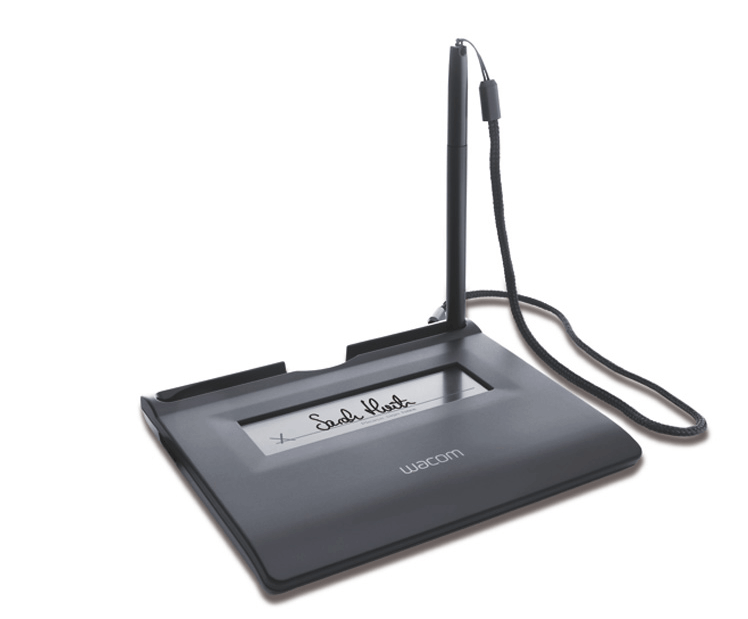 Wacom STU-300 LCD Signature PadView specifications →
 Wacom STU-300B LCD Signature PadView specifications →
 Wacom STU-500 LCD Signature PadView specifications →
 Wacom STU-530 Color LCD Signature PadView specifications →
Frequently Asked Questions
What is a Wacom signature pad?
It is an LCD tablet on which a person signs with a pen, capturing the signature electronically along with biometric data — pressure, speed and rhythm. That data is bound to the document, so a Wacom signature carries far more evidential weight than a scanned image of one.
What is the difference between the STU-430 and the STU-540?
Screen and colour. The STU-430 has a 4.5″ monochrome display at 320 × 200; the STU-540 has a 5″ colour display at 800 × 480 with a larger active area. Both offer 1024 pressure levels. Choose the STU-540 when branding or on-screen terms matter, the STU-430 for straightforward high-volume signing.
What is the difference between the STU-540 and the STU-541?
The display and pen performance are the same. They differ in encryption and connectivity options — the STU-541 uses TLS encryption between the device and the PC. Which one suits you depends on your security policy and how the pad connects, and we can advise on that.
Do I need a signature pad or a signature display?
If the signer must read the full document on screen before signing, you need a signing display such as the DTU-1141B. If they are signing a document already presented to them elsewhere — on paper, on a monitor, or in your application — a pad is smaller, cheaper and sufficient.
Are Wacom electronic signatures legally valid in the UAE?
Yes. Electronic signatures are recognised under the UAE Electronic Transactions and Trust Services Law (Federal Decree-Law No. 46 of 2021). Wacom pads support compliance by capturing the biometric characteristics of the signature, which can be used to verify the signer later.
Can a Wacom signature pad work with our existing system?
In most cases yes. Signing can be added through sign pro PDF API for document workflows, or the Wacom Ink SDK for signature to capture directly inside your own application. We scope the integration against your platform before recommending hardware.
Not sure which pad fits your process? Tell us what you sign, how often, and what system it lives in — request a consultation and we will specify the pad, the software and the integration, with UAE pricing.