Wacom DTK-1651 Signature Pen Display
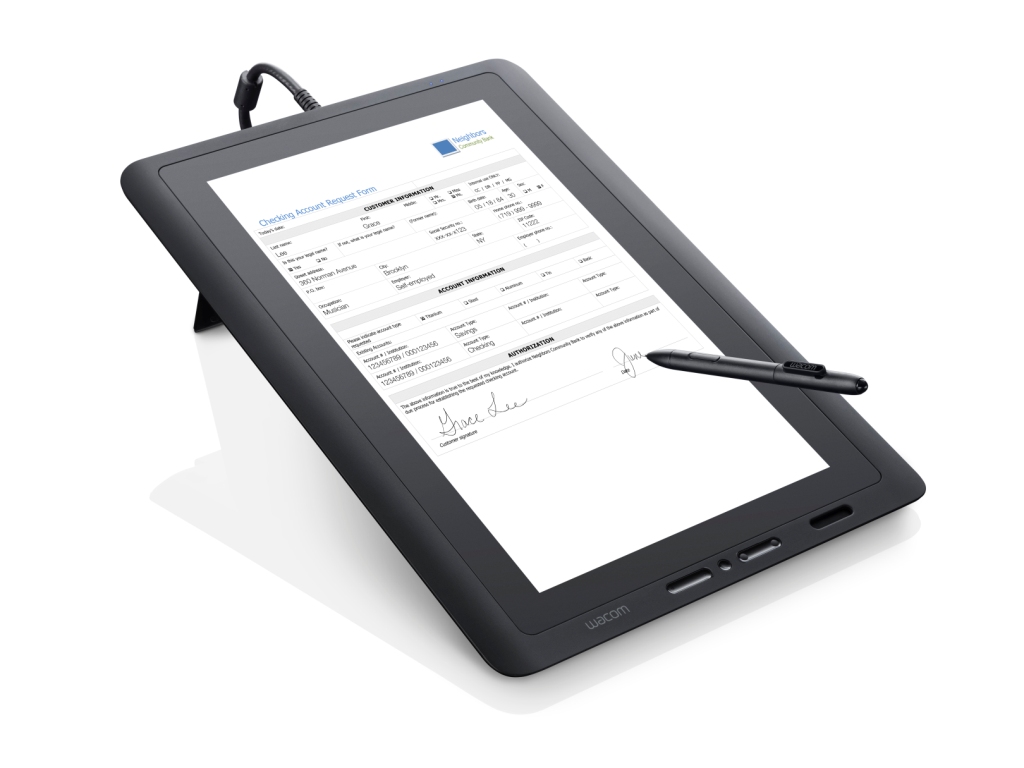
The Wacom DTK-1651 combines a 15.6″ Full HD LCD with state-of-the-art encryption. It is the premium option for eSignature work, letting customers view and sign full-sized documents in either portrait or landscape orientation, flat on the desk or raised on its built-in stand.
- Display Type: 15.6-inch Full HD LCD
- Orientation: Convertible portrait and landscape
- Positioning: Flat on desk or on built-in stand
- Connection: 3-in-1 cable for power, HDMI and USB
- Pen: Cordless and battery-free
- Encryption: State-of-the-art encryption
- 1 Year Warranty
Streamline your workflow and transition to a seamless, paperless environment with the Wacom DTK-1651 Pen Display. It suits banking, legal and government counters handling full-page contracts where the entire document must be visible and legible before it is signed.
The ability to convert between portrait and landscape matters more than it sounds: a portrait A4 contract reads naturally in portrait, which removes the scrolling that frustrates signers on smaller landscape displays.
A single 3-in-1 cable carries power, HDMI and USB, and the slim design keeps the desk footprint small despite the large screen. The application software of the Signature Set is sign pro PDF. The software allows electronic registration of handwritten signatures and their integration into PDF documents. The software not only records the signature image that is displayed on the tablet or screen, but also the non-visible biometric data such as pressure, travel and speed. Subsequently, the document and the signature can not be modified and are protected securely. Then, the document can be saved, printed or sent.
What’s included with Wacom DTK-1651
The Wacom DTK-1651 package includes everything needed to connect the device to a compatible computer and start setting up your digital signature workflow.
- Wacom DTK-1651 Pen Display
- Cordless and battery-free digital pen
- 3-in-1 cable (power, HDMI, USB)
- Built-in stand
- Quick Start Guide
View and Sign Full-Size Documents
- At 15.6 inches and Full HD, the DTK-1651 displays a full-size document without compromise, so signers read the actual terms at a comfortable size rather than scrolling through fragments.
- Portrait and landscape modes plus flat or stand-mounted positioning let you match the display to the document and the counter rather than the other way round.
Built for Secure Electronic Signatures
- State-of-the-art encryption secures each signing transaction, which is why this model is specified for high-value agreements.
- If the document does not need a 15.6-inch screen, the DTU-1141B or DTC121 deliver the same signing capability in a smaller and more economical form.
Frequently Asked Questions
What is the Wacom DTK-1651 used for?
Viewing and signing full-sized documents on a 15.6-inch Full HD display. It converts between portrait and landscape and sits flat on a desk or raised on its built-in stand, which makes it the premium option for eSignature work.
Why does portrait mode matter?
A portrait A4 contract reads naturally in portrait. On smaller landscape displays the signer scrolls constantly, which is exactly what causes people to sign without reading. This removes that friction.
How is it connected?
A single 3-in-1 cable carries power, HDMI and USB, so despite the large screen the desk stays tidy and there is one lead to route through a counter rather than three.
Is a 15.6-inch display overkill for signing?
Often, yes — and we will say so. It earns its cost where full-page contracts must be legible in one view, typically banking, legal and government. If not, the DTU-1141B or DTC121 do the same job smaller and cheaper.
What security does it offer?
State-of-the-art encryption securing each signing transaction, which is why this model gets specified for high-value agreements where the signature has to stand up to scrutiny.
Are signatures captured on it legally valid in the UAE?
Yes. Electronic signatures are recognised under the UAE Electronic Transactions and Trust Services Law (Federal Decree-Law No. 46 of 2021). The device supports compliance by capturing the biometric characteristics of the signature alongside the visible mark.
How do developers integrate it?
Through the Wacom Ink SDK for signature for capture inside your own application, or the sign pro PDF API where you want complete PDFs signed from an existing CRM, ERP or document system. The sign pro PDF application covers it with no development at all.
How much does the Wacom DTK-1651 cost in the UAE?
Ask us for a current quote. Pricing depends on quantity, bundled software and integration work, and we price hardware, software and development together with UAE delivery and local support.
Need this configured for your workflow?
Tell us what you sign, how often, and which system it lives in. We will specify the hardware, software and integration — with UAE pricing.