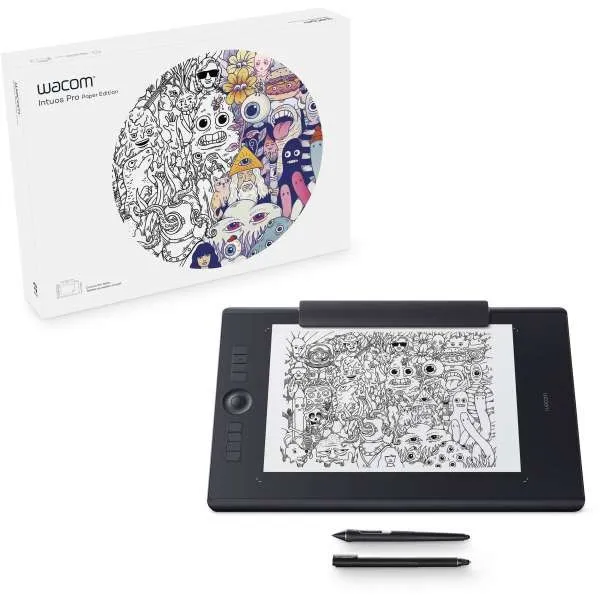
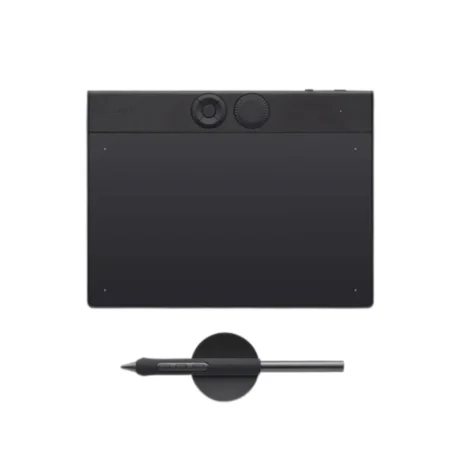
The Wacom Intuos Pro Large Paper Edition PTH-860P-N holds a sheet of A4 paper over a 311 x 216 mm tablet surface, so a full-page ink sketch is captured digitally as you draw it, with Wacom Pro Pen 2 at 8,192 pressure levels.
Model Code: PTH-860P-N
Generation: 2017 Intuos Pro Paper Edition
Tablet Size: Large
Active Area: 311 x 216 mm
Paper Capture: Wacom Paper Clip included, holds A4 paper over the tablet surface
Pen: Wacom Pro Pen 2, cordless and battery-free
Pen Pressure Levels: 8,192
Pen Tilt: ± 60 degrees
Multi-Touch: Yes
ExpressKeys: 8 customisable, plus Touch Ring
Connectivity: Bluetooth 4.2 or USB
Ergonomics: Ambidextrous, for right or left-handed use
Compatible Ink Pens: Wacom Finetip Pen (0.4 mm gel) and Wacom Ballpoint Pen (1.0 mm oil), sold separately
A4 is the size architects, concept artists and anyone trained on paper actually work at. The Large Paper Edition takes a full A4 sheet under the clip, over a 311 x 216 mm active area, so nothing about the drawing has to be scaled down to fit the device.
You sketch in ink; the tablet records the strokes at 8,192 pressure levels with ± 60 degrees of tilt. The result is a physical page and a digital file of the same drawing, ready to be developed on screen. Take the clip off and it is a full 2017 Intuos Pro Large: multi-touch, eight ExpressKeys, Touch Ring, Bluetooth 4.2 or USB, and ambidextrous.
Why Specify the Large Paper Edition
Full A4 paper capture, with no need to scale a drawing to fit the device.
A 311 x 216 mm active area, the largest in the 2017 Intuos Pro range.
Wacom Pro Pen 2 at 8,192 pressure levels with ± 60 degrees tilt, battery-free.
Multi-touch, eight customisable ExpressKeys and a Touch Ring.
Bluetooth 4.2 or USB, and ambidextrous for right or left-handed use.
Who It Is For
This is the model for people whose thinking happens on paper: concept artists working up thumbnails, architects sketching plans and elevations, and traditional artists moving into a digital pipeline without abandoning the medium they trained in. The digital file arrives as a by-product of the way they already work.
Which Ink Pen to Use
The Wacom Finetip Pen has a 0.4 mm gel ink nib for detailed line work. The Wacom Ballpoint Pen has a 1.0 mm oil ink nib for fast, confident sketching. Both are sold separately and both capture at 8,192 pressure levels.
How We Supply It
eTOP Trading LLC is an Authorized Wacom Solution Provider based in Dubai. This is a previous-generation model. Tell us whether A4 paper capture is essential and we will quote the Paper Edition or the current Intuos Pro Large (PTK870) accordingly.
Frequently Asked Questions
What is the Wacom Intuos Pro Large Paper Edition?
It is a professional pen tablet supplied with the Wacom Paper Clip, which holds an A4 sheet over a 311 x 216 mm active area so ink sketches are captured digitally as they are drawn.
What paper size does it take?
A4. The Medium Paper Edition (PTH-660P-N) takes A5.
What pressure and tilt does it capture?
8,192 pressure levels and ± 60 degrees of pen tilt, using Wacom Pro Pen 2.
Can it be used without paper?
Yes. Remove the paper clip and it works as a standard Intuos Pro Large pen tablet with multi-touch.
Is it suitable for left-handed use?
Yes. The design is ambidextrous and can be configured for right or left-handed use.
Need this configured for your workflow?
Tell us what you sign, how often, and which system it lives in. We will specify the hardware, software and integration — with UAE pricing.