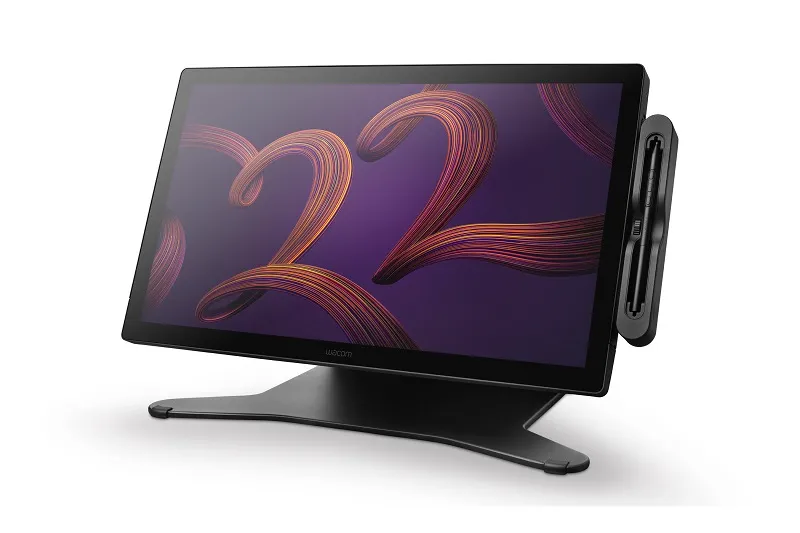
Wacom Cintiq Pro 22 (DTH227) 4K Pen Display with Stand
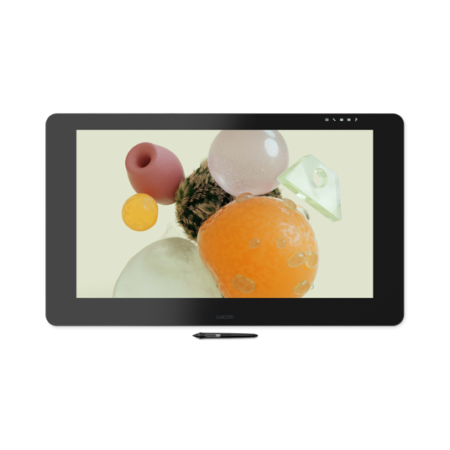
The Wacom Cintiq Pro 22 puts a 21.5-inch 4K IPS panel and Wacom Pro Pen 3 on your desk, with the Wacom Adjustable Stand included. It is the middle of the Cintiq Pro range and the size most working illustrators and designers settle on.
- Display Size: 21.5 in (54.6 cm)
- Display Resolution: 3840 x 2160 pixels
- Display Technology: IPS
- Colour Gamut: DCI-P3 99% (CIE 1931, typ)
- Displayable Colours: 1.07 billion (10-bit x RGB = 30-bit)
- Active Area: 476 x 268 mm (18.7 x 10.5 in)
- Brightness: 300 cd/m2 (typ)
- Contrast Ratio: 1200:1 (typ)
- Response Time: 12 ms (typ)
- Viewing Angle: 170 degrees (85/85 H, 85/85 V, typ)
- Surface: Edge-to-edge tempered glass with AG etching
- Multi-Touch: Yes – 10 fingers
- Pen: Wacom Pro Pen 3
- Pen Technology: Electromagnetic resonance, cordless and battery-free
- Pen Pressure Levels: 8192
- Pen Tilt: 60 degrees
- Pen Resolution: 5080 lpi
- Product Weight: 5.0 kg (11.0 lbs)
The Wacom Cintiq Pro 22 is a 21.5-inch 4K pen display built for professional illustration, design and animation. It combines an IPS panel with DCI-P3 99% colour coverage, Wacom Pro Pen 3 and 10-finger multi-touch, and this configuration ships with the Wacom Adjustable Stand included.
With 3840 x 2160 across a 476 x 268 mm active area, the Pro 22 gives you a genuinely large working canvas without taking over the desk the way the 27 does. The higher 1200:1 contrast ratio in this model holds shadow detail well, which matters in concept art and photo work.
It is the size most working professionals settle on: big enough to draw comfortably at full scale, small enough to sit in a normal studio setup and be repositioned when the job changes.
What is included with the Wacom Cintiq Pro 22
This configuration is supplied with the stand, so it is ready to work at a comfortable angle out of the box.
- Wacom Cintiq Pro 22 pen display
- Wacom Pro Pen 3
- Wacom Adjustable Stand
- Pen case with replacement nibs
- Nib removal tool
- Connection cables
- AC power adapter and power cable
- Quick Start Guide
- Warranty documentation
Designed for Professional Creative Work
- A 476 x 268 mm active area gives room for full-scale drawing while still fitting a conventional desk.
- DCI-P3 99% coverage with 10-bit depth across 1.07 billion colours makes it suitable for colour-critical illustration, design and animation.
- A 1200:1 contrast ratio, the highest in the Cintiq Pro range, helps hold detail in darker areas of an image.
- Edge-to-edge tempered glass with anti-glare etching keeps reflections manageable in a lit studio.
Draw Naturally with Wacom Pro Pen 3
- 8,192 levels of pressure sensitivity for precise control over line weight, opacity and brush behaviour.
- 60-degree tilt recognition so compatible applications respond to the angle of the pen.
- 5080 lpi pen resolution keeps fine detail accurate.
- Cordless and battery-free, so there is nothing to charge mid-session.
Work Faster with Multi-Touch
Ten-finger multi-touch lets you pan, zoom and rotate the canvas with your free hand while the pen stays on the artwork.
For anyone moving constantly around a large file, that removes a steady stream of small interruptions across a working day.
Comfortable for Long Creative Sessions
The included Wacom Adjustable Stand lets you set the display angle to suit how you work, whether that is close to flat for drawing or raised for review and colour work.
At 5.0 kg the Pro 22 is manageable enough to reposition when the job changes, which is part of why this size suits mixed studio work.
Frequently Asked Questions
What is the Wacom Cintiq Pro 22?
A professional 21.5-inch 4K pen display with an IPS panel, DCI-P3 99% colour coverage, Wacom Pro Pen 3 and 10-finger multi-touch, supplied here with the Wacom Adjustable Stand.
Does the Cintiq Pro 22 need a computer?
Yes. It is a pen display rather than a standalone computer, so it connects to a compatible Windows or Mac workstation and shows what is on that machine.
What is the screen size and resolution?
The panel is 21.5 inches (54.6 cm) at 3840 x 2160, with a 476 x 268 mm active drawing area.
Is the stand included?
Yes. This configuration ships with the Wacom Adjustable Stand, so the display can be set to a comfortable working angle without buying a separate mount.
Cintiq Pro 22 or Cintiq Pro 27?
The 27 gives a larger canvas and a wider viewing angle; the 22 has a higher contrast ratio, costs less and fits a normal desk more easily. Unless you specifically need the extra size, the 22 is the more practical choice.
Does the Cintiq Pro 22 support touch?
Yes, 10-finger multi-touch alongside the pen.
How much does the Wacom Cintiq Pro 22 cost in the UAE?
Pricing moves with configuration, stock and quantity. Request a quote for current UAE pricing, delivery and warranty terms.
Can I use it with Windows and macOS?
Yes, with a compatible Windows or macOS system. Connection depends on the ports your machine has, and we will confirm the right cable and adapter combination for your workstation before you order.
Does the pen need charging or batteries?
No. Wacom Pro Pen 3 uses electromagnetic resonance technology and draws power from the display itself, so there is nothing to charge and no battery to replace.
Do you supply and support this in the UAE?
Yes. We are an Authorized Wacom Solution Provider based in Dubai. Everything we supply carries manufacturer warranty, and we handle setup, driver configuration and after-sales support ourselves.
Need this configured for your workflow?
Tell us what you sign, how often, and which system it lives in. We will specify the hardware, software and integration — with UAE pricing.