 Dubai:
 :
: 

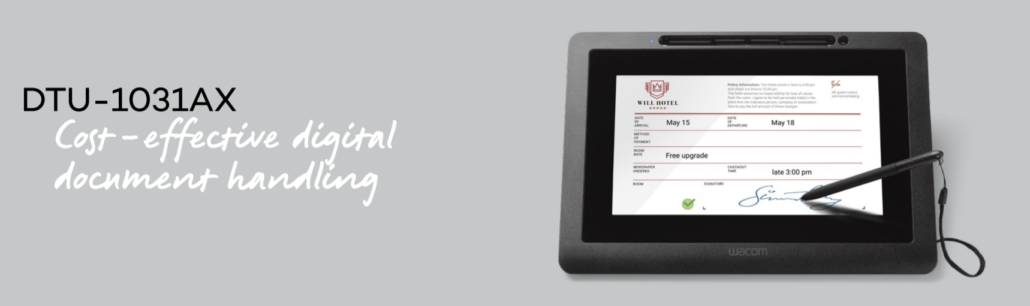
Wacom Signature Display DTU-1031AX
The DTU-1031AX Pen Display is our most economical device for viewing, annotating and signing full size documents electronically. It’s ideal for organizations that need a compact device to let customers read and sign documents on screen.
The DTU 1031AX is easy to integrate into kiosk or POS environments with minimal effort and clutter. It’s also comfortable and intuitive for people to use in hand, or lying flat on a counter.
In addition, when not in document mode, the DTU-1031AX can display slideshows or advertising videos. This helps organizations run promotions and up-sell with minimum effort and cost.
Wacom DTU-1031AX Price @ 1725.00 AED
DTU-1031 features and benefits
• Optimal user comfort with the 10.1”, 1024 x 600 resolution, color LCD panel that allows easy document viewing and signing.
• Secure transactions enabled by advanced AES256/RSA2048 encryption
• Unique hardware ID (UID) to identify the exact unit used for any transaction
• Minimal installation clutter with a single USB cable that supplies power and data, minimizing clutter at the counter or point-of-sale.
• Highly accurate signatures and writing with the patented Wacom cordless and battery-free pen, featuring 512 levels of pressure sensitivity.
• Flexible working position via a slim profile that allows the device to be used flat on the counter, or at an angle with the integrated stand. VESA mounting holes allow for mounting options or the use of third-party arms and stands.
• Kensington® Security Slot to secure the unit when needed.
• Outstanding durability via the scratch-resistant hardened cover glass that provides easier viewing in different lighting conditions
Optimal comfort
Secure transactions
Flexible convenience
Why the DTU-1031AX Is the Right Starting Point for Document Signing in the Middle East
For organizations exploring electronic document signing for the first time, the DTU-1031AX removes the usual barriers. It is Wacom’s most accessible signing display — not because it cuts corners, but because it delivers everything a business genuinely needs for counter-based document signing without the overhead of a larger, more complex device. The 10.1-inch color screen is large enough for customers to comfortably read what they are signing. The AES256/RSA2048 encryption is the same standard used in Wacom’s premium range. And the single USB cable setup means any counter, kiosk, or reception desk in your organization can be signing-ready within minutes of installation.
Who Uses the DTU-1031AX Across the Middle East
The DTU-1031AX fits naturally into environments where document signing is frequent but the physical setup needs to stay lean. Government service counters handling resident applications use it where counter space is shared between multiple functions. Insurance branches deploy it at client-facing desks for policy sign-offs and claim acknowledgments. Telecom operators use it at point-of-sale counters for contract signing during activations and upgrades. Medical clinics that need patient consent capture without the footprint of a larger display also find it the practical fit. What connects all these environments is a shared need — reliable, secure, electronic signing at a counter without a complicated installation or a large device dominating the workspace.
DTU-1031AX vs DTU-1141B — Which One Does Your Business Need
Both devices sit in the same category — compact signing displays — but they serve slightly different needs. The DTU-1031AX has a 1024×600 resolution screen and 512 pen pressure levels, making it well-suited for standard document viewing and signing where the content is straightforward. The DTU-1141B steps up to Full HD 1920×1080 with an IPS panel, 1024 pressure levels, and four ExpressKeys on the bezel. If your customers need to read detailed documents — contracts with fine print, multi-page agreements, or forms with small text — the DTU-1141B’s sharper display makes that experience noticeably better. If your signing workflow involves simpler forms, consent captures, or delivery confirmations, the DTU-1031AX handles it cleanly at a lower investment per counter.
Does the DTU-1031AX need an external power supply?
No. It runs entirely on USB bus power from the connected computer, which is why a single USB cable handles both power and data. No power brick, no additional cables.
What drivers are needed for the DTU-1031AX?
It requires the Wacom driver for pen input functionality and the MCT driver for the display. Both must be installed before connecting the device. It can also function as a standard HID device without the Wacom driver, though full pen performance requires the driver installed.
Is the DTU-1031AX compatible with kiosk setups?
Yes. Its slim profile, VESA 75mm mounting holes, and integrated stand make it suitable for both standard counter deployment and custom kiosk installations. It can be used flat, angled on the integrated stand, or mounted to a third-party arm or bracket.
Can the screen show content when not in signing mode?
Yes. When not active for document signing, the DTU-1031AX can display slideshows, promotional content, or advertising material from the connected computer — making it a dual-purpose screen between signing sessions.