 Dubai:
 :
: 

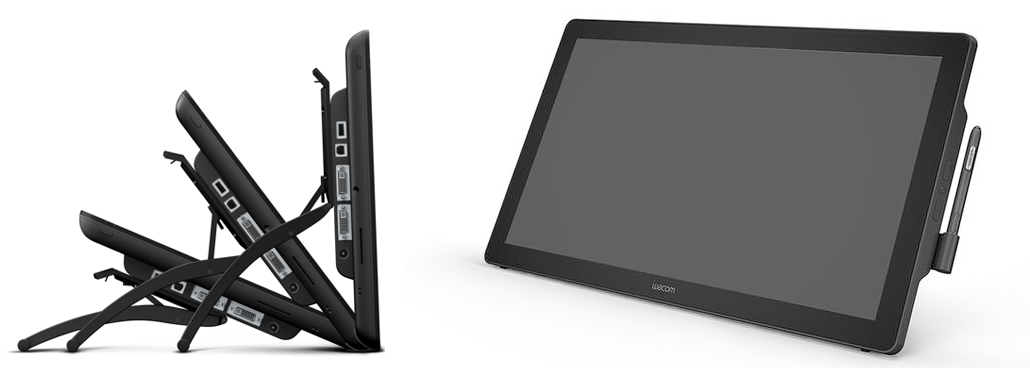
Wacom DTK-2452 Pen Display
Wacom DTH-2452 24″ Pen + Touch Display
The DTH-2452 Interactive Pen and Touch Display is a premium communication tool. The 23.8-inch LCD with high resolution and wide viewing angle provides a large screen for users to work on. The freedom of the pen allows you to turn static material into active and engaging content. Add drawings, sketches and diagrams to presentations or lesson plans to elaborate on key concepts and spontaneously integrate new ideas into the discussion. The DTK-2451 offers Wacom’s industry leading pen-input performance. The DTH-2452 adds responsive multi-touch input for navigation and gesture support.
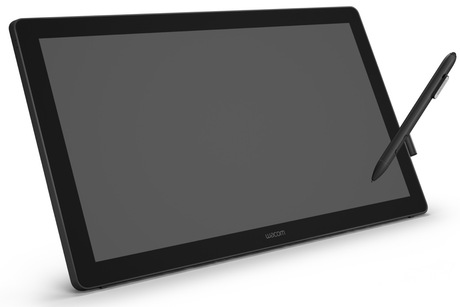
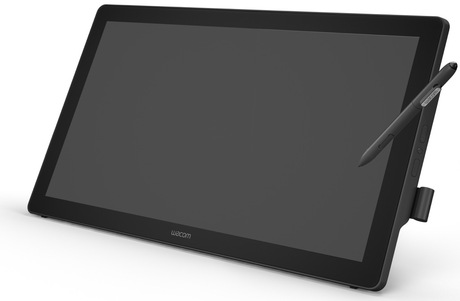
Wacom DTH2452 Specifications: DTH-2452 24″ Pen + Touch Display
- 23.80″, 1920 x 1080, 210 nit
- Designed to improve workflow and enhance visual communication
- For teaching, educators can mark up and annotate presentations, or design lesson plans for interactive teaching
- In business settings, the pen on screen can be used to complete electronic forms using digital ink, and capture signatures directly in documents
- Multi-touch functionality for intuitive navigation and support for common gestures
- HDCP compliant
- Hardened anti-glare etched glass ensures visibility and durability
- Standard DVI-I and USB connections for easy installation
- Secure eDocument transactions thanks to state-of-the-art encryption
- Four integrated ExpressKeys for frequently used tools
- A built-in video pass-thru connector that allows mirroring directly from pen display to another display
- Multi-angle tilting stand to position the screen is the most comfortable angle for writing
- VESA mountable for use with external stands or arms
- Landscape mode only
- Software sold separately
-
Display size: 60.5 cm (23.8″)
-
Colour display: Yes
-
Physical resolution: 1920 x 1080
-
Aspect ratio: 16:9
-
Contrast: 1,000:1
-
Brightness: 210 cd/m²
-
Viewing angle (horizontal / vertical): 178° / 178°
-
Response time: 16 ms
-
Pen pressure levels: 2,048
-
Application: E-signature
-
Features: Stand feature & Stylus holder
-
Colour: Black
-
Connectors: 1 x DVI & 1 x USB 2.0
-
Security: Biometric identification
-
Special features: Optional VESA mounting
-
Dimensions (W x H x D): 601 x 356 x 46 mm
- Weight: 7.2 kg
- Product type: Pen display
-
PC: Windows® 8, Windows® 7, Windows®
-
Vista SP3
-
Mac: Mac OS X 10.6.8 or later
-
Internet connection for software download, powered USB port
What the DTH-2452 Adds That Other Signing Displays Do Not
The key distinction of the DTH-2452 is in its name — the H in DTH stands for the addition of multi-touch input alongside pen functionality. Every other device in Wacom’s signing display range is pen-only. The DTH-2452 lets users interact with the screen using both the pen and their fingers, which opens up a different category of use cases. Navigating through a long document with a natural swipe, pinch-zooming into a section for closer reading, and using touch-based gestures to move between form fields — all of this is available on the DTH-2452 in addition to precise pen-based signing and annotation. For environments where customers or staff interact with the screen independently rather than just signing on instruction, this makes a genuine difference to how natural and intuitive the experience feels.
Who the DTH-2452 Is Built For in the Middle East
The 23.8-inch screen and dual pen-and-touch input make the DTH-2452 a strong fit for environments where the display serves multiple roles. Training centers and corporate learning environments across the Middle East use it for interactive sessions where the trainer annotates live content while participants follow on the screen. Hospital specialists use it to walk patients through scans, reports, and treatment plans — drawing directly on imaging to explain findings, then capturing consent signatures in the same session. Legal firms use it for contract review meetings where both parties can interact with the document on screen before signing. The combination of 2048 pen pressure levels and responsive multi-touch makes it capable across all of these contexts without compromise.
DTH-2452 vs DTK-2241 — Pen Only vs Pen and Touch
Both devices are large-format interactive pen displays in the 21-24 inch range, and both serve professional document environments. The practical difference is touch. The DTK-2241 is pen input only — precise, reliable, and purposeful for structured signing and annotation workflows. The DTH-2452 adds multi-touch for users who want the flexibility of finger navigation alongside pen input, and its 2048 pressure levels versus the DTK-2241’s 1024 means the pen also captures more detailed biometric signature data. For environments where the display is used interactively by multiple people across different tasks, the DTH-2452 is the more versatile choice. For focused document-signing counters where pen precision is the only requirement, the DTK-2241 remains a cleaner option.
What is multi-touch used for on the DTH-2452?
Multi-touch allows finger-based interaction with the screen — scrolling through documents, pinch-zooming, swiping between pages, and using common touch gestures for navigation. The pen handles precise writing, annotation, and signature capture. Both inputs work independently and can be used in combination depending on the software and workflow.
Does the DTH-2452 support electronic signature capture?
Yes. The EMR pen with 2048 levels of pressure captures full biometric signature data including pressure, speed, and stroke sequence. When used with Wacom’s Sign Pro PDF or integrated via the Wacom Ink SDK, signed documents include cryptographic hashing that protects against post-signing modification — making signatures legally valid under electronic transaction regulations across the Middle East.
What connections does the DTH-2452 use?
It connects via DVI-I and USB 2.0. A built-in video pass-through connector allows mirroring to a projector or secondary display. It also includes four integrated ExpressKeys for shortcut access to commonly used functions.
Can the DTH-2452 be mounted on a wall or arm?
Yes. It includes VESA mounting compatibility for attachment to third-party arms, wall brackets, or custom stands. The multi-angle tilting stand is also included for standard desk use at a comfortable writing angle.
Is the DTH-2452 landscape mode only?
Yes. The device operates in landscape orientation only — portrait rotation is not supported.