
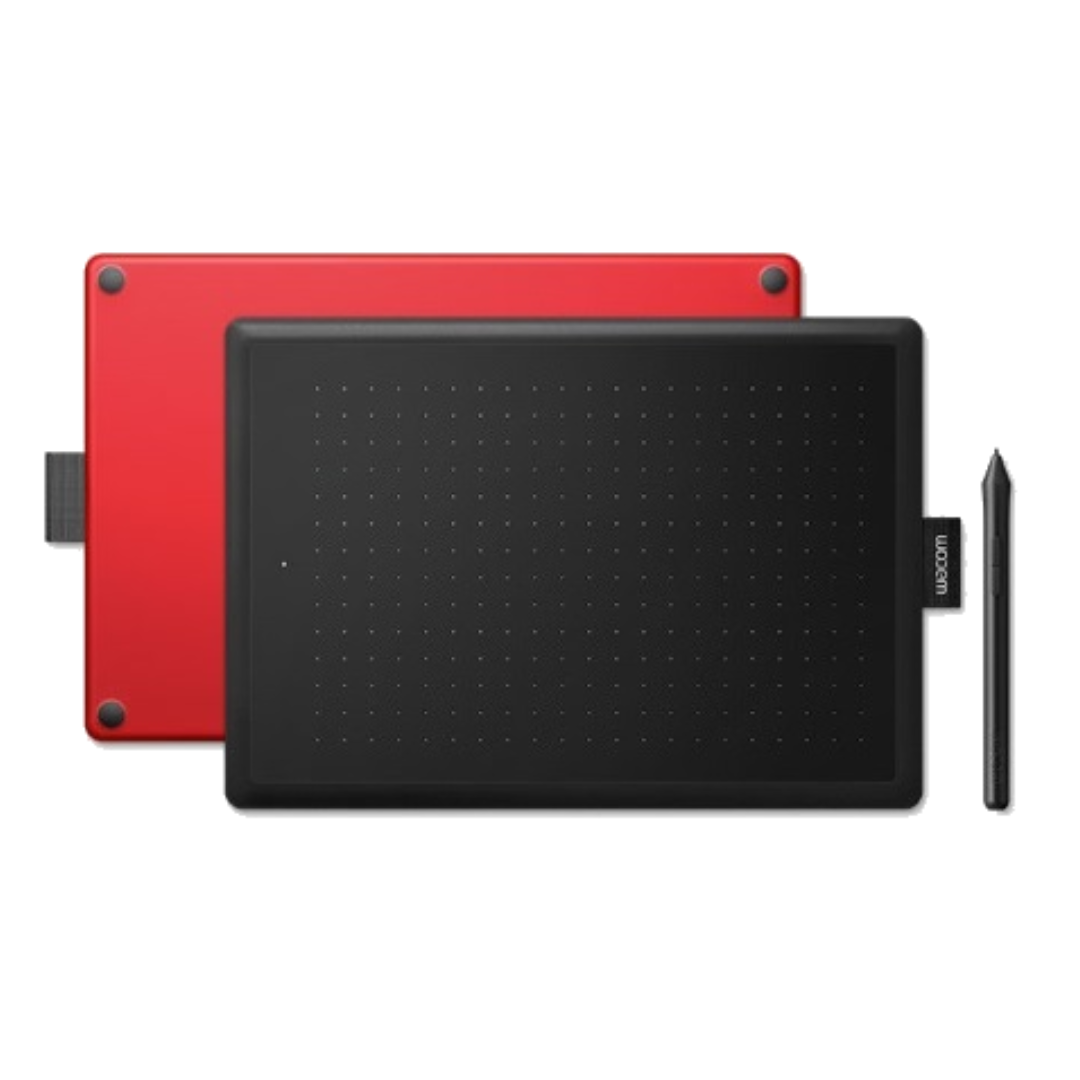
Wacom One by Wacom Small (CTL-472-N)
This guide covers everything UAE buyers need to know about the Wacom One by Wacom Small (CTL-472-N) — from core specifications and real-world performance to a direct comparison with the Wacom Intuos Small. By the end, you will know exactly whether this tablet fits your workflow or whether a step-up model is the smarter choice.
Key Takeaways
- Battery-Free EMR Pen: Uses Wacom’s electromagnetic resonance technology with 2,048 pressure levels, requiring no charging or replacement batteries.
- Cross-Platform Compatibility: Works seamlessly with Windows 7 or later, macOS 10.10 or later, and Chromebook (ChromeOS).
- Compact & Portable: Measures 210 x 146 x 8.7 mm and weighs approximately 250 g, featuring a 152 x 95 mm active area.
- Designed for Learning: An affordable, entry-level solution tailored for students, teachers, e-learning, and training labs across the UAE.
What Is the Wacom One by Wacom Small (CTL-472-N)?
The Wacom One by Wacom Small CTL-472 is an entry-level, non-display creative pen tablet launched by Wacom in 2015, designed to give beginners, students, and educators access to genuine EMR pen input at the lowest price point in the Wacom lineup. Users draw on the tablet surface while viewing their work on a connected monitor — no screen is built into the device itself. The One by Wacom Small is positioned firmly as a learning and education tool, not a professional production device.
Battery-Free EMR Pen Input: The Core Advantage of the Wacom CTL-472-N
The Wacom One by Wacom Small CTL-472 is built around Wacom’s electromagnetic resonance (EMR) technology, which powers the pen without any battery. This means UAE institutions and individuals never face charging downtime or the ongoing cost of replacement batteries.
The included Wacom LP-190K pen delivers 2,048 pressure levels at a report rate of 133 points per second, with a reading height of up to 7 mm above the surface and a pen resolution of 2,540 lpi. These specifications produce smooth, responsive strokes for drawing, annotation, and handwriting tasks.
The Wacom CTL-472 includes the following pen input capabilities:
- Battery-free EMR pen (LP-190K): No charging or battery replacement required.
- 2,048 pressure levels: Enables variable line weight in drawing and annotation.
- 2 customizable side buttons: Configurable via Wacom driver for shortcuts like right-click or undo.
- 133 pps report rate: Ensures smooth, lag-free pen tracking.
- 2,540 lpi resolution: Provides accurate pen positioning across the active area.
Compact Design and Cross-Platform Compatibility
The Wacom One by Wacom Small CTL-472 measures 210 x 146 x 8.7 mm and weighs approximately 250 g, with an active drawing area of 152 x 95 mm (6.0 x 3.7 in) at a 16:10 aspect ratio. This makes it one of the most space-efficient pen tablets available for shared workstations, computer labs, and laptop-based workflows.
Cross-platform support is a meaningful operational benefit for UAE buyers. The Wacom CTL-472 is compatible with Windows 7 or later, macOS 10.10 or later, and Chromebook (ChromeOS) — covering the mixed device fleets common across UAE universities, schools, and corporate training environments. Connection is via a detachable USB Type-A to micro USB cable, with power drawn directly from the USB port — no external adapter is needed.
Build and Physical Design
The Wacom One by Wacom Small CTL-472 features a distinctive black matte top surface with a red underside, making it visually identifiable in shared lab and classroom settings. The tablet body is plastic with a matte drawing surface engineered to provide Wacom’s standard pen-on-paper tactile feel. The LP-190K pen weighs approximately 9–10 g, keeping hand fatigue minimal during extended annotation or drawing sessions.
The Wacom CTL-472 has no hardware ExpressKeys on the tablet body. This is a deliberate cost reduction for the entry-level tier, meaning users rely on keyboard shortcuts or on-screen tools during creative work — a limitation frequently raised in user feedback from online creative communities.
Which Software Platforms Work With the Wacom CTL-472?
The Wacom One by Wacom Small CTL-472 works with the full Wacom driver stack, which integrates with major creative and productivity applications used in UAE education and design environments. A Wacom driver download is required for full pressure sensitivity and pen button customization on Windows and macOS — plug-and-play functionality is basic without the driver installed.
Confirmed compatible software platforms for the Wacom CTL-472 include:
- Adobe Photoshop and Adobe Illustrator for photo editing and vector design
- Corel Painter for digital painting workflows
- Clip Studio Paint for illustration and manga-style art
- Mainstream note-taking and whiteboard applications used in e-learning platforms
Users in creative communities report that some software requires explicit tablet mapping and pressure curve configuration to perform optimally with the Wacom CTL-472. Additionally, Wacom drivers can occasionally conflict with touchpad drivers in laptop setups, requiring a configuration adjustment after installation.
Sketch, draw, and edit photos with the natural-feel pen. This tablet, WACOM CTL-472-N One by Wacom Small – EMEA-North has everything you need, so it’s easy to get started on your next project. Just connect the USB cable to your Mac or PC, download and install the driver and you’re ready to go. It couldn’t be easier. Here are the following features of Wacom CTL-472-N.
– Digital creativity made easy
– Electromagnetic Technology: Sketch and paint with more precision. Our advanced electromagnetic pen technology gives you excellent control and accuracy. One by Wacom helps your art projects come out just the way you’ve always wanted, by perfectly matching the movement of your pen.
– Natural-feel pen: A responsive, ergonomic, pressure-sensitive pen gives you a natural way to sketch, draw, paint, or edit photos. The pen doesn’t need batteries, so it’s lightweight, perfectly balanced, and comfortable enough to use as long as you like.
– The right size for you: The small One by Wacom tablet-only takes up a tiny amount of your desk but still gives you enough space to create. It also fits easily into your bag.
FEATURES
- Pressure-sensitive, accurate pen
- Lightweight pen – no batteries
- Familiar feel, like pen on paper
- Easy plug-in via USB
- Compact size, easy to carry with you on the go
WHAT’S INCLUDED
- Small Pen Tablet
- Pen
- 1 meter USB cable
- 3 standard replacement pen nibs
- nib removal tool
- quick start guide
- regulation sheet
SPECIFICATION
| Product Code | CTL-472 |
| Color | Top – Black; Bottom – Red |
| Weight | 260 g (0.57 lbs) |
| Size (W x D x H) | 210 x 146 x 8.7 mm (8.3 x 5.7 x 0.3 in), without tag and rubber foot |
| Pen Active Area (W * D) | 152 x 95mm (6.0 x 3.7 in) |
| What’s Included: | Small Pen Tablet, Pen, 1 meter USB cable, 3 standard replacement pen nibs, nib removal tool, quick start guide, regulation sheet |
| Pen Technology | Electro-magnetic resonance technology |
| Pen Pressure levels | 2048 levels |
| Pen Size (L X D) | 138.8×11.5 mm |
| Pen Weight | 10 g ±2 g |
| Active Area Aspect Ratio | 16:10 |
| Pen Coordinate Resolution | 100 lines per mm (2540 lines per inch) |
| Pen Coordinate Accuracy | +/-0.5 mm (0.02 in) |
| Pen Readable Height | 7 mm (0.28 in) |
| Pen Report Rate/Speed | 133 pps |
| Power Consumption | Normal use: 24mA |
| Power Requirements | DC 5V from USB Port with 500 mA capacity. (Self-powered USB hub or PC USB port) |
| System Specifications | Windows® 7 or later, OS X 10.10 or later, standard USB Type-A port, internet access to download driver (for tablet to work) |
Who Should Buy the Wacom One by Wacom Small CTL-472-N in the UAE?
The Wacom One by Wacom Small CTL-472 is the right choice for UAE buyers whose primary need is affordable, reliable pen input rather than advanced professional features. This tablet is purpose-built for entry-level and educational use cases across Dubai, Abu Dhabi, and the wider GCC region.
Specific buyer profiles where the Wacom CTL-472 delivers clear value include:
- Students in art, design, and architecture programs at UAE universities needing pen input for coursework and digital projects.
- School pupils using tablets for visual note-taking, online lessons, and creative assignments.
- Teachers and trainers annotating slides, writing on digital whiteboards, and explaining concepts with pen input in e-learning environments.
- Hobbyists exploring digital drawing, practice sketches, and basic photo retouching for social media.
- Training centers and academies in Dubai and Abu Dhabi seeking cost-effective pen tablets for multi-user lab rollouts.
- Junior designers and interns using pen input for basic tasks before upgrading to a more advanced Wacom model.
Wacom One by Wacom Small CTL-472 vs Wacom Intuos Small CTL-4100: Which One Is Right for Your Use Case?
The core differences in pressure sensitivity, hardware shortcuts, and wireless capability make the right choice straightforward once buyer needs are clear.
| Feature | Wacom One by Wacom Small CTL-472 | Wacom Intuos Small CTL-4100 |
|---|---|---|
| Model / SKU | CTL-472 | CTL-4100 / CTL-4100WL (Bluetooth) |
| Core Technology | Wacom EMR, battery-free pen | Wacom EMR, battery-free pen |
| Pressure Levels | 2,048 | 4,096 |
| Tablet ExpressKeys | None | 4 customizable ExpressKeys |
| Bluetooth / Wireless | No — USB only | Yes — available in Bluetooth model (CTL-4100WL) |
| Bundled Software | Not typically included | Creative software licenses bundled in some regions |
| Key Differentiator | Lowest cost genuine Wacom pen input | Higher sensitivity and workflow shortcuts for hobbyists |
| Best For | Beginners, students, educators, and training labs | Serious hobbyists, semi-professional designers, and creative workers |
| Connectivity | USB Type-A (detachable cable) | USB Type-A; Bluetooth on WL variant |
The Wacom CTL-472 is the practical choice for any UAE buyer prioritising cost efficiency and simplicity over advanced creative features. The Intuos Small CTL-4100 justifies its higher positioning for users who need double the pressure sensitivity, built-in shortcut keys, and the freedom of wireless connectivity — all of which matter in a more demanding creative workflow.
Community feedback from digital art forums consistently shows that beginners rarely utilise 4,096 pressure levels in their early months of learning — making the Wacom CTL-472 a sensible starting point. Users who outgrow the CTL-472 typically cite the absence of ExpressKeys and the smaller pressure range as the triggers for upgrading to the Intuos series.
Choose the Wacom One by Wacom Small CTL-472 if…
- You are a student or beginner buying your first pen tablet and want genuine Wacom quality at entry-level cost.
- You need pen input for annotation, e-learning, or digital note-taking rather than advanced illustration.
- Your institution is deploying tablets across a lab or classroom and budget per unit is the primary constraint.
Choose the Wacom Intuos Small CTL-4100 if…
- You are a serious hobbyist or semi-professional who needs 4,096 pressure levels for more nuanced artwork.
- You want hardware ExpressKeys on the tablet to speed up repetitive actions without leaving the pen.
- You prefer wireless freedom and are prepared to invest more for a Bluetooth-enabled workflow.
What Is the Wacom CTL-472-N Price in UAE and Where Can You Buy It?
The Wacom One by Wacom Small CTL-472 is confirmed available in the UAE market. Pricing is available on request through wacomme.ae, along with current availability, bundle options, and full UAE warranty support.
wacomme.ae is an Authorized Wacom Solution Provider for the Middle East, supplying genuine Wacom CTL-472 units with regional warranty coverage and full support for driver installation, setup guidance, and bulk orders for schools, training centers, and academies across the UAE and wider GCC region.
Wacom CTL-472-N FAQ
What is the Wacom CTL-472-N price in UAE?
The Wacom One by Wacom Small CTL-472 is available in the UAE, and current pricing can be confirmed directly through wacomme.ae. Pricing varies by availability and bundle configuration, so contacting wacomme.ae for an up-to-date quote is recommended.
Where can I buy the Wacom One by Wacom Small CTL-472 in Dubai?
The Wacom One by Wacom Small CTL-472 is available for purchase in the UAE through wacomme.ae, the authorised Wacom partner for the Middle East. wacomme.ae provides genuine units, regional warranty, and support for individual and bulk orders including delivery across Dubai and the UAE.
Does the Wacom CTL-472-N come with UAE warranty?
The Wacom One by Wacom Small CTL-472 carries a standard Wacom limited warranty, with regional warranty terms applicable to UAE purchases through authorised partners. Buyers purchasing through wacomme.ae receive genuine regional warranty support — always confirm warranty specifics at the point of purchase.
Is the Wacom One by Wacom Small CTL-472 better than the Wacom Intuos Small CTL-4100?
The Wacom One by Wacom Small CTL-472 is the better choice for beginners, students, and educators who need affordable, reliable pen input without advanced features. The Wacom Intuos Small CTL-4100 is the stronger option for serious hobbyists and semi-professionals who need 4,096 pressure levels, 4 ExpressKeys, and optional Bluetooth. Neither is objectively superior — the right choice depends entirely on workflow complexity and budget.
What is included in the box with the Wacom CTL-472?
The Wacom One by Wacom Small CTL-472 box includes the pen tablet unit, the Wacom LP-190K battery-free EMR pen, a USB Type-A to micro USB connection cable, replacement pen nibs (typically 3 spare nibs), and a quick start guide with warranty documentation. No external power adapter is included as the tablet draws power via USB.
Does the Wacom CTL-472 work with Chromebook?
The Wacom One by Wacom Small CTL-472 is marketed by Wacom as compatible with Chromebook on ChromeOS, making it a practical choice for UAE schools and training environments where Chromebooks are part of the device fleet. Compatibility may vary by Chromebook model, so verifying with wacomme.ae before bulk procurement is advisable.
Does the Wacom CTL-472 require a driver?
The Wacom One by Wacom Small CTL-472 requires a Wacom driver download to unlock full pressure sensitivity, pen button customization, and tablet mapping on Windows and macOS. Basic USB pointer functionality works without the driver, but full creative performance depends on the driver being installed and kept up to date.