 Dubai:
 :
: 

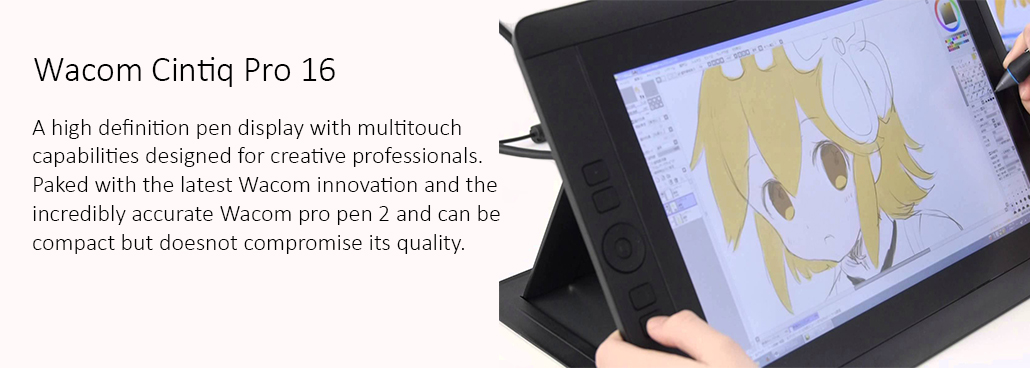
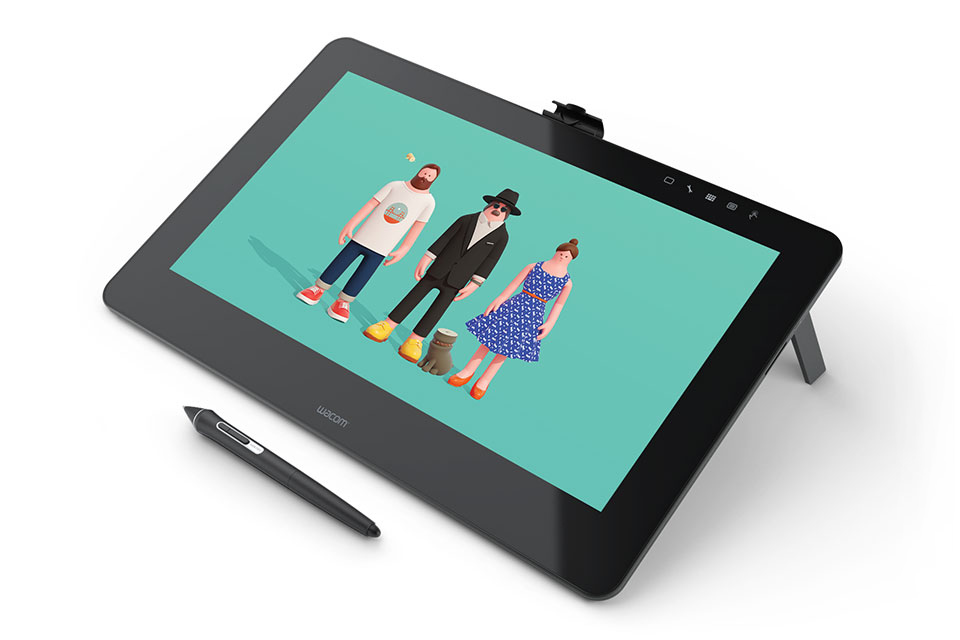
Wacom Cintiq Pro16 Creative Pen Display
Wacom Cintiq Pro16 Creative Pen Display
Create directly on screen with our most natural pen experience
Wacom Cintiq Pro16 Creative Pen Display
Create directly on screen with our most natural pen experience
Wacom Cintiq Pro 16 offers our most recent Wacom Pro Pen 2 and screen innovation – and more space to interface with your work. Regardless of whether you deal with Mac or PC, Wacom Cintiq Pro is our most progressive imaginative pen show, worked for professional specialists and fashioners.
Live. Set out. Make.
Wacom Cintiq Pro is the most advanced Wacom interactive display in the smallest format. Designed for professional artists and designers who want to feel a direct connection of the pen to the screen for their work. Packed with the latest Wacom innovations and the incredibly accurate Wacom Pro Pen 2.
The Wacom Cintiq Pro 16 is the most advanced Wacom interactive display in the smallest format. Designed for professional artists and designers who want to feel a direct connection of the pen to the screen for their work. Packed with the latest Wacom innovations and the incredibly accurate Wacom Pro Pen 2, the Wacom Cintiq Pro 16 can be compact, but it does not compromise its quality.
WACOM PRO PEN 2: NATURAL AND PRECISE
Wacom Pro Pen 2 will instantly become your favorite authoring tool. It is more responsive, more precise and more responsive than any pen ever created by Wacom.
CONNECTED TO YOUR SCREEN
Enjoy a Wacom Cintiq Pro 16 UHD (3.840 x 2.160px) resolution on a crisp 16 “LCD display. And with a wide range of colors (94% of Adobe® RGB) you can be sure that what you see is extreme color presumption.
The Cintiq Pro 16 in the Middle East — Who It’s Really For
The Cintiq Pro 16 is not an entry-level tablet you grow into. It is the device professional creatives in the Middle East reach for when they are ready to stop compromising. Graphic designers at agencies across the region use it as their primary production tool — the 4K resolution means every detail in brand artwork, packaging design, and print-ready files is visible at full clarity on screen. Architects and interior designers use it for hand-rendered concept work and digital sketching on top of CAD exports. Animators use it for frame-by-frame character work. Illustrators who take client briefs use it because the color accuracy — 94% of the Adobe RGB spectrum — means what they deliver to print matches exactly what they approved on screen. If your livelihood depends on what you create digitally, the Cintiq Pro 16 is the device that stops slowing you down.
What Makes the Pro 16 Different from Every Other 16-Inch Display
The gap between the Cintiq Pro 16 and a standard monitor with a drawing overlay is the lamination. On the Pro 16, the LCD panel and the glass surface are fused into a single unit, which means the pen tip appears to land exactly where you draw — not a few millimeters underneath a layer of glass. This parallax elimination is what separates professional pen displays from budget alternatives, and it is the single biggest factor that experienced artists notice immediately. Add to that the Pro Pen 2’s 8,192 levels of pressure sensitivity, ±60-degree tilt recognition, and virtually zero lag, and the result is a drawing experience that responds to how you actually hold and move a pen — not an approximation of it.
Cintiq Pro 16 vs Cintiq 13HD — Choosing the Right Size
The 13HD and the Pro 16 are aimed at users who want a portable, desk-friendly pen display, but they represent different stages of professional commitment. The 13HD uses a 1080p screen without lamination and runs on the older Pro Pen with 2,048 pressure levels. It is capable and compact, and it works well for artists who are earlier in their professional journey or who need to move the device frequently. The Cintiq Pro 16 adds a 4K screen, laminated glass, the Pro Pen 2 at 8,192 levels, and a significantly more accurate drawing surface. For freelancers taking on client work, agency designers, or anyone who spends more than a few hours a day drawing digitally, the Pro 16 justifies its premium quickly. The 13HD is where you start. The Pro 16 is where you stay.
Cintiq Pro 16 vs Cintiq 22HD — Size vs Technology
The 22HD offers more screen — 21.5 inches versus 16 — and comes with 16 built-in ExpressKeys which many studio artists rely on for workflow shortcuts. However, its display is 1080p without lamination, and it uses an older pen generation. The Pro 16 answers back with 4K resolution, laminated glass, Pro Pen 2 precision, and USB-C connectivity. The question is whether you value a larger working canvas with more physical shortcut buttons, or superior display technology with more accurate pen performance in a form factor that travels and sits on any desk. Studio artists who work at a fixed workstation and rely heavily on ExpressKeys often prefer the 22HD. Freelancers, designers who work across different environments, and anyone prioritizing display quality choose the Pro 16.
Does the Cintiq Pro 16 work with a single USB-C cable?
Yes, if your computer supports USB-C with video output (DisplayPort Alt Mode), a single USB-C cable handles power, video, and data. For computers without this, a mini DisplayPort cable plus a separate USB cable is required. The Wacom Link adapter (sold separately) also enables connection to a wider range of ports.
Does the Cintiq Pro 16 have ExpressKeys?
No. The Pro 16 does not have built-in ExpressKeys. Wacom’s reasoning is that the device is designed for artists who use keyboard shortcuts, but an optional Wacom ExpressKey Remote can be purchased and paired wirelessly if physical shortcut buttons are part of your workflow.
What pen comes with the Cintiq Pro 16?
No. The Pro 16 does not have built-in ExpressKeys. Wacom’s reasoning is that the device is designed for artists who use keyboard shortcuts, but an optional Wacom ExpressKey Remote can be purchased and paired wirelessly if physical shortcut buttons are part of your workflow.
Is the Cintiq Pro 16 suitable for color-critical work like print design or photography?
Yes. The 94% Adobe RGB coverage and factory color calibration make it reliable for color-sensitive workflows. For print design, it is worth calibrating the display using a colorimeter on arrival to match your specific output targets, as factory calibration is accurate but general.
Can the Cintiq Pro 16 be used with a drawing arm or VESA mount?
The Cintiq Pro 16 does not include VESA mounting holes in its standard configuration. An optional Wacom-compatible mounting arm accessory is available for users who want to position it on an articulating arm above their desk.