
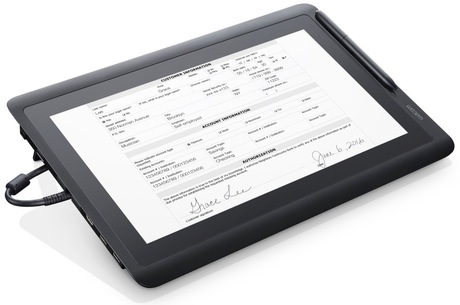
This guide covers the full Wacom eSignature hardware and software portfolio available in the UAE, helping decision-makers in banking, healthcare, government, and corporate sectors choose the right combination of signature pads, pen displays, and software for their specific workflows. By the end, you will know which Wacom device fits your counter, desk, or enterprise deployment — and how to get it deployed across UAE branches.
Why eSignatures Matter for UAE Organisations
Most UAE organisations still process signatures on paper forms, printed contracts, or basic click-to-accept digital fields — none of which provide the biometric evidence needed to defend a disputed transaction. Manual signing workflows also create slow customer onboarding, high printing and storage costs, and weak audit trails that expose institutions to fraud risk.
Wacom eSignature solutions address this directly by capturing true handwritten signatures at the point of service and embedding them into documents with cryptographic protection. The result is a tamper-evident record that logs who signed, when, on which device, and with what pen pressure and stroke pattern — creating a defensible audit trail across every branch.
What Are Wacom eSignature Solutions?
Wacom eSignature solutions are a portfolio of dedicated electronic signature hardware and software designed to capture secure, handwritten digital signatures with associated biometric data and embed them into digital documents and workflows. The portfolio serves banks, hospitals, government service centres, and corporate businesses across Dubai, the UAE, and the wider Middle East.
The hardware range spans two families: compact STU series signature pads for teller and counter use, and larger DTU, DTK, and DTH series pen displays where customers can view and sign documents on the same screen. On the software side, Wacom offers three integration paths: sign pro PDF for out-of-the-box desktop signing, the sign pro PDF API for semi-automated workflows, and the Signature SDK / STU SDK for full custom integration into core banking, EMR, ERP, and document management systems.
All Wacom eSignature devices use electromagnetic resonance (EMR) pen technology delivering approximately 2540 lpi resolution and 1024 pressure levels, with AES-256 and RSA-2048 encryption applied to captured signature data and embedded documents.
Wacom eSignature Hardware for UAE Deployments
Wacom eSignature hardware for UAE deployments is available in two distinct form factor families, each matched to a different customer interaction model — compact signature pads for counter throughput, and large pen displays for document review and advisory settings.
STU Series Signature Pads
- Wacom STU-430: Features a 4.5-inch monochrome LCD at 320 x 200 resolution, a footprint of 161 x 96 x 10 mm, and weighs approximately 0.2 kg — making it the most compact and cost-effective choice for high-volume bank teller lines, clinic reception desks, and government service counters. The STU-430-CH2 bundle includes sign pro PDF, enabling ready-to-use PDF signing without additional software procurement.
- Wacom STU-540: Steps up to a 5.0-inch color TFT LCD at 800 x 480 resolution and adds virtual COM port serial connectivity alongside USB, offering a richer on-pad interface for customer-facing branding.
- Wacom STU-541: Shares the same 5.0-inch color display but is USB-only. The STU-540-CH2 bundle includes sign pro PDF for immediate deployment at premium branch counters and hospitality service points.
DTU, DTK, and DTH Pen Displays
- Wacom DTU-1141B: A 10.1-inch Full HD IPS display (1920 x 1080, 16.7 million colors) that connects via a single USB 2.0 cable for video, data, and power, with a footprint of 225 x 148 x 11 mm and a weight of approximately 0.7 kg. Customers can read and sign the full document on the same screen, making it ideal for compact service desks and branch counters requiring a full-document signing experience.
- Wacom DTK-2451 and DTH-2452: 23.8-inch Full HD displays (1920 x 1080, 16.7 million colors) suited to advisor desks and meeting rooms. The DTK-2451 is pen-only; the DTH-2452 adds capacitive multi-touch for more interactive document navigation. Both weigh approximately 6.0–6.5 kg and are designed for environments where customer comfort during document review is a priority.
Biometric Signature Capture: The Core Security Differentiator
Wacom eSignature devices capture handwritten signatures with embedded biometric data — pen pressure, signing speed, and stroke order and timing — recorded simultaneously with the signature image on every Wacom STU, DTU, DTK, and DTH device using sign pro PDF or the Wacom Signature SDK.
This biometric layer is what separates Wacom eSignatures from click-to-accept or scanned-signature methods. A captured Wacom signature can be forensically analysed to verify the signer’s identity and intent, which directly supports dispute resolution and fraud reduction for UAE banks, insurers, and healthcare providers.
Wacom eSignature security is built on four enforced technical layers:
- AES-256 encryption for data transmission between the signature pad and the host system
- RSA-2048 encryption applied to signature data and documents via sign pro PDF and the SDK stack
- Cryptographic document hashing that makes any post-signing alteration detectable
- Unique hardware ID (UID) per STU device, creating a device-level audit record for every signing event
- Timestamps and session logs recording who signed, when, and on which registered device
Software Paths: From Simple to Fully Integrated
Wacom eSignature software is structured across three integration tiers so UAE organisations can adopt at their current digital maturity level and scale without replacing hardware.
- sign pro PDF: A Windows desktop application that lets staff create or open PDFs, fill forms, annotate documents, and capture handwritten signatures with biometric data and cryptographic hashing. It is the fastest path to deployment and is included in CH2 hardware bundles.
- sign pro PDF API: Adds automation — predefining signature field positions and automating placement for standardised documents such as loan agreements, consent forms, and KYC applications. This is the right choice for organisations with known, repeatable document formats.
- Wacom Signature SDK and STU SDK: Enable full custom integration into core banking platforms, EMR and HIS systems, ERP platforms, and document management systems. The SDK path requires IT development effort but delivers a seamless, embedded eSignature workflow inside existing enterprise applications — the standard choice for large multi-branch UAE deployments.
Who Should Buy Wacom eSignatures in the UAE?
Wacom eSignature solutions are designed for UAE organisations that process signed documents at physical service points and need a legally defensible, auditable record of each signing event.
- Banking & Finance: Dubai and Abu Dhabi banks deploying Wacom STU signature pads at teller counters can accelerate account opening, loan agreement signing, and KYC processing while creating a centralised audit trail across all branches.
- Healthcare: Healthcare facilities — including hospitals and outpatient clinics in Dubai Healthcare City and across the emirates — can replace paper consent forms with Wacom pen display signing integrated directly into their EMR or HIS workflows.
- Government & Enterprise: Government service centres processing citizen applications, permits, and licenses benefit from the STU series’ compact footprint and the clear device-level audit logs required for public accountability. Corporate HR teams, telco counters, and service businesses with multi-location operations across the UAE and GCC can use the Signature SDK to embed consistent signing into any enterprise application, from onboarding platforms to vendor contract management systems.
Wacom STU-430 vs Wacom STU-300: Which One Is Right for Your Use Case?
The Wacom STU-430 and Wacom STU-300 are both compact signature pads for counter and desk deployments, but they serve different budget and capability requirements. UAE buyers should understand the specific differences before specifying hardware for a multi-branch rollout.
| Feature | Wacom STU-430 | Wacom STU-300 |
|---|---|---|
| Model / SKU | STU-430 / STU-430-CH2 | STU-300 series |
| Core Technology | EMR pen, monochrome LCD | EMR pen, smaller entry-level display |
| Display Size | 4.5-inch, 320 x 200 monochrome | Smaller than STU-430, basic UI |
| On-Pad UI Capability | Programmable soft keys and branded UI | Fewer programmable UI elements |
| Color Display Option | No (monochrome); STU-540 for color | No color display |
| Key Differentiator | Mid-range counter pad with CH2 bundle option | Entry-level, lowest cost deployment |
| Best For | Bank tellers, clinic reception, government counters | Small businesses needing basic signature capture |
| Connectivity | USB 2.0 | USB |
The Wacom STU-430 is the practical choice for established UAE enterprises that need a dependable, mid-range signature pad with branding flexibility and sign pro PDF bundle availability. Professional feedback from B2B deployments consistently highlights the STU-430’s reliable performance in high-volume environments and its natural signing feel due to EMR pen input. The STU-300 suits smaller businesses or branch pilots where cost is the overriding factor and on-pad UI sophistication is not required.
IT teams should note that both devices require Windows-based driver and software configuration, and users in VDI environments report that USB redirection setup for STU devices sometimes requires specific Citrix or VMware configuration before pads are reliably recognised.
Choose the Wacom STU-430 if…
- Your UAE branch counters process high daily signing volumes and need a reliable, tested pad
- You want the CH2 bundle with sign pro PDF included for immediate deployment
- Your workflow requires programmable on-pad soft keys or a branded signing interface
Choose the Wacom STU-300 if…
- You are a small business or running a low-volume pilot and need the lowest entry cost
- Basic signature capture without advanced on-pad UI is sufficient for your workflow
- Branding and customer-facing display quality are not priorities for your deployment
What Is the Wacom eSignatures Price in UAE and Where Can You Buy?
Wacom eSignature hardware and software pricing varies by device model, bundle configuration, software licensing tier, and deployment scale. Pricing is available on request through wacomme.ae, along with current availability, bundle options, and full UAE warranty support.
Wacom eSignature solutions — including the full STU signature pad range, DTU, DTK, and DTH pen displays, sign pro PDF bundles, and SDK licensing — are confirmed available in the UAE market. wacomme.ae covers deployment across all seven emirates, with additional coverage across KSA, Qatar, Kuwait, Oman, Bahrain, and other GCC and Middle East markets.
Software and Integration Details
Wacom eSignature software integrates with named enterprise platforms across three confirmed layers:
- Adobe Acrobat and Acrobat Reader are supported via virtual printer and plug-in approaches for PDF signing workflows.
- Microsoft Office documents are handled via PDF export followed by signing in sign pro PDF.
- Core banking and EMR/HIS systems are integrated via the Wacom Signature SDK and STU SDK using custom development — no specific vendor names have been publicly confirmed by Wacom for these integrations.
On-premise Windows environments are fully supported for sign pro PDF and all SDK-based applications. VDI deployments using Citrix or VMware can pass through Wacom STU devices via USB redirection, though IT teams report this sometimes requires specific configuration. Cloud-hosted applications can integrate with Wacom devices via client-side components and server APIs, where signature capture occurs at the endpoint and signed documents are stored in a cloud DMS.
Legal and Compliance Context in the UAE
The governing legislation for electronic signatures in the UAE is the UAE Electronic Transactions and Trust Services Law (Federal Decree-Law No. 46 of 2021), which establishes the legal recognition of electronic signatures and trust services across federal entities. Wacom eSignature solutions support compliance with this law through biometric signature capture, cryptographic document hashing, and complete audit logging — but legal validity ultimately depends on the overall process, software configuration, and organisational policies implemented by the deploying institution.
Electronic hardware sold in the UAE is also subject to the Emirates Authority for Standardization and Metrology (ESMA) and the Emirates Conformity Assessment Scheme (ECAS), as well as Federal Law No. 10 of 2018 on Product Safety and the related Cabinet Resolution No. 66 of 2023 on executive regulations covering electronic devices. For cross-border operations, Wacom eSignature architecture is designed to align with eIDAS, ESIGN, and UETA frameworks, enabling UAE organisations engaged in international financial or healthcare transactions to use a single technical stack across jurisdictions.
Frequently Asked Questions (FAQ)
What is the Wacom eSignatures price in UAE?
Wacom eSignature solution pricing in the UAE varies by hardware model, software bundle, and deployment scale. Pricing is available on request through wacomme.ae, along with current availability, bundle options, and UAE warranty details.
Where can I buy Wacom eSignature solutions in Dubai?
Wacom eSignature hardware and software for Dubai and the wider UAE is available through wacomme.ae, the authorised Wacom partner for the Middle East and Africa. wacomme.ae covers all seven emirates and regional GCC markets.
Do Wacom eSignature devices come with UAE warranty support?
UAE warranty support for Wacom eSignature devices is available through wacomme.ae.
Key Takeaways
- Biometric Security: Wacom devices capture true handwritten signatures with embedded biometric data (pressure, speed, stroke order) backed by AES-256 and RSA-2048 encryption.
- Hardware Portfolio: Choose compact STU series pads (like the STU-430 and STU-540) for bank tellers and counters, or larger DTU, DTK, and DTH pen displays for document review and advisory desks.
- Flexible Software Paths: Scale from out-of-the-box sign pro PDF desktop apps to automated APIs and full SDK integrations for core banking, EMR, and ERP systems.
- UAE Compliance: Solutions support compliance with UAE Federal Decree-Law No. 46 of 2021 and relevant ESMA/ECAS hardware safety standards.
- Where to Buy: Available across all seven emirates through wacomme.ae.