 Dubai:
 :
: 

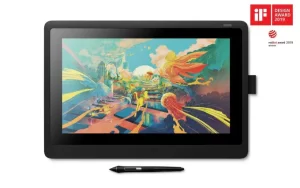
Wacom Cintiq is a creative pen display that helps you bring your ideas to life on screen. Vibrant color, HD clarity and ergonomic design combined with the super-responsive Pro Pen 2 to take your work to the next level.
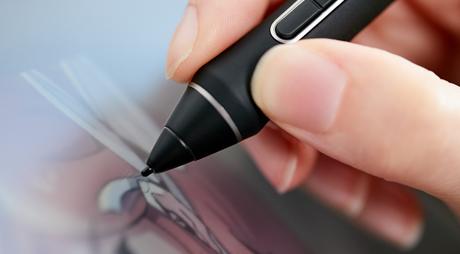
Premium pen technology
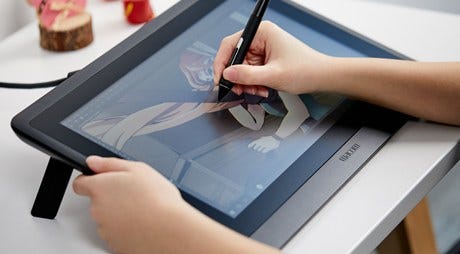
Adjustable design
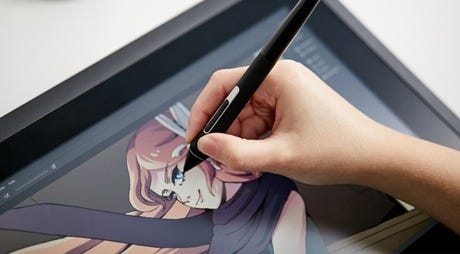
Glare reductionFeatures
- Exceptional creative pen technology with 8,192 levels of pressure sensitivity and tilt-recognition.
- EMR (Electro-Magnetic Resonance) tech draws power from your Wacom Cintiq, meaning you never need to charge the pen.
- Designed for comfort, with rubber grip and accessible side buttons.
- Use the pen’s programmable side buttons to make shortcuts to your favorite software.
- The anti-glare film cuts out distracting reflections.
- See your cursor appear exactly where you would expect with reduced parallax.
- Durable, scratch-resistant materials perfect for daily use.
- The hand rests to help cut down on fatigue when drawing.
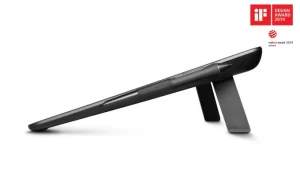
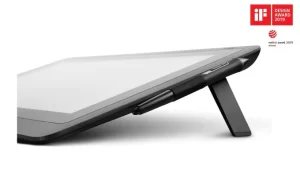
- Integrated foldable legs let you adjust the position so you can work in comfort.
- Full HD display lets you see your work in crystal clear detail.

Wacom Pro Pen 2 – Natural and precise

Virtually no lag

No parallax

Natural tilt recognition

No batteries or recharging
What’s included
- Wacom Cintiq 16 Pen display
- Wacom Pro Pen 2
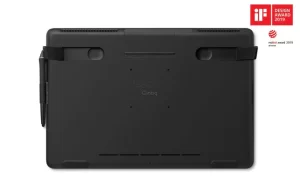
- Detachable Pen holder with 3 replacement nibs (standard) and nib removal tool
- 3-in-1 cable (1.8m)
- AC adaptor (12V, 3A, 36W)
- Power cable (1.8m)
- Quick Start Guide
- Warranty card (Japan, AP, China only)
- Regulation sheet
Click here to add your own text
-
Specification
Model Number DTK1660K0B Display Size / Resolution 39.6 cm (15.6 in) / Full HD 1920 x 1080 Active Area 344 x 194 mm (13.6 x 7.6 in) Size 422 x 285 x 24.5 mm (16.6 x 11.2 x 1 in) Weight 1.9 kg without optional stand Colour Performance 72% NTSC (CIE1931) typical / 96% sRGB (CIE 1931) typical Viewing Angle 176/176 (typ) Contrast Ratio 1000:1 (typ) Response Rate 22 ms Power Consumption Power ON mode (MAX): 27 W
Power sleep mode: 0.5 W or less (non-connection USB cable) Power OFF mode: 0.5 W or lowerAspect Ratio / Brightness 16:9 / 210 cd/m2 (typ) Color Temperature / Custom Color 9300K, 6500K, 5000K, Custom RGB Connectivity 3-in-1 cable (with HDMI 1.4, USB 2.0 and AC adapter) Pen Battery-free Pro Pen 2 with 2 customizable side switches and 8,192 pressure levels in both pen tip and eraser (patented electromagnetic resonance technology) Pen Tilt Recognition / Range ±60 levels / 60 degrees ExpressKey™ Remote (optional) 17 customizable, application-specific ExpressKeys, Touch Ring, Rocker Ring/Home Button, Precision Mode, Display Toggle, Radial Menu, and dedicated pan, scroll, zoom, brush size Stand Integrated foldable legs for 19° angle; optional Adjustable Stand for 19°–68° angle Security Kensington® Lock Slot (lock purchased separately) Productivity Boosters Time-saving on-screen settings; ExpressKeys™, Touch Ring on optional ExpressKey™ Remote Ergonomics Right or left-handed use; integrated foldable legs; optional Adjustable Stand available; Wacom Pro Pen 2 with comfortable, ergonomic grip Compatibility / System Requirements Windows® 7 or later (latest service pack/build), Mac OS® X 10.12 or later (latest update); Internet access for driver download What’s Included Wacom Cintiq 16 pen display, Wacom Pro Pen 2, detachable pen holder with 3 replacement nibs (standard) and nib removal tool, 3-in-1 cable (1.8 m), AC adapter (12 V, 3 A, 36 W), power cable (1.8 m), Quick Start Guide, warranty card (Japan, Asia Pacific, China only), regulation sheet Additional Accessories ExpressKey™ Remote, Adjustable Stand, Wacom Soft Case L, Wireless Bluetooth® Keyboard, Wacom Pro Pen 2, Wacom Pro Pen 3D, Wacom Pro Pen Slim, replacement nibs, prior generation pens (Pro, Classic, Art, Airbrush, Grip)
What the Wacom Cintiq 16 (DTK1660K0B) Is
The Wacom Cintiq 16 is the entry point into the Cintiq pen display range — a 15.6-inch Full HD pen display that connects to any Mac or Windows computer and lets you draw directly on screen. It carries the Pro Pen 2 stylus at 8,192 levels of pressure sensitivity, an anti-glare etched glass surface, and a fully adjustable stand, all in a format compact enough for any desk. The DTK1660K0B is the current SKU for this configuration. If you are looking for a professional pen display that delivers genuine Wacom pen quality at the most accessible price in the Cintiq range, the Cintiq 16 is where that starts.
Where the Cintiq 16 Sits in the Range — and Why That Matters
The Cintiq range now spans from the Cintiq 16 at the entry level through the Cintiq 22 and then up into the Cintiq Pro series — 16, 17, and 27 inches. The Cintiq 16 is the non-Pro model, which means two specific things: the display runs at 1920×1080 Full HD rather than 4K, and the glass is not laminated — there is a small gap between the cover glass and the display panel that creates a slight parallax effect, most visible near screen edges. What it does share with every other Cintiq is the Pro Pen 2 at 8,192 pressure levels and ±60-degree tilt recognition — the same stylus performance you get on the Cintiq Pro 16 and Pro 27. For buyers who need genuine professional pen input at a manageable investment, the Cintiq 16 delivers the pen experience first and accepts the display trade-offs as the price of entry.
Who the Cintiq 16 Is For
The Cintiq 16 serves a well-defined group of buyers. Freelancers building their practice who want to move from an Intuos tablet to direct on-screen drawing without the full Pro investment find the Cintiq 16 the right first pen display. Students at design schools and art universities across the Middle East who need a professional drawing surface for their coursework find it the most accessible Cintiq that takes their work seriously. Illustrators and graphic designers who are confident that pen-on-screen is the right workflow for them but are not yet at the stage where 4K or lamination justifies the premium choose the Cintiq 16 because it removes the spatial disconnect of a standard tablet immediately and at the right price. It is also a strong choice for studios equipping shared workstations where professional pen quality matters but per-unit cost is a practical constraint.
Cintiq 16 vs Cintiq Pro 16 — Understanding the Gap
Both the Cintiq 16 and the Cintiq Pro 16 are 15.6-inch pen displays with the Pro Pen 2. The differences are display quality and lamination. The Cintiq Pro 16 runs at 4K UHD (3840×2160) versus the Cintiq 16’s Full HD (1920×1080) — a resolution difference that is clearly visible in fine line work, detailed textures, and small text. The Pro 16 also uses a fully laminated display where the glass and panel are fused — eliminating the parallax gap present on the Cintiq 16. For artists at an early stage of their professional journey, or for studios where budget per workstation is a priority, the Cintiq 16 is the practical answer. For professionals whose output is reviewed or printed at high resolution, or who draw with precision across the full screen surface, the Pro 16’s display quality is worth the additional investment.
Cintiq 16 vs Cintiq 22 — Screen vs Portability
The Cintiq 22 gives you 21.5 inches of drawing space compared to the Cintiq 16’s 15.6 inches — a canvas difference that is meaningful for illustrators who work on complex compositions and frequently zoom out to check proportion. Both run at 1080p without lamination, and both use the Pro Pen 2. The Cintiq 16 is more compact, lighter, and more desk-friendly for smaller workspaces. The Cintiq 22 is the fixed studio tool for artists who have decided that large canvas space is the priority. If desk space is limited or the device will occasionally move between locations, the Cintiq 16 is the more practical choice. If you draw for most of your working day at a fixed desk and want every bit of canvas available, the Cintiq 22 is the better long-term investment.
The Cintiq 16 Across the Middle East
Design students and early-career creative professionals across the UAE and Saudi Arabia who are moving from a basic pen tablet to their first pen display find the Cintiq 16 the right transition — it establishes direct on-screen drawing without requiring the premium investment of the Pro range. Freelance illustrators taking on commercial clients for the first time invest in the Cintiq 16 as the device that changes what their workflow looks and feels like without overcommitting at an early stage. Studios specifying multiple workstations for junior designers or shared creative spaces find the Cintiq 16 balances professional Wacom pen quality with a per-unit cost that makes it practical to equip an entire team. Contact us for current Cintiq 16 (DTK1660K0B) pricing in the UAE and Middle East.
What is the model code DTK1660K0B?
DTK1660K0B is the SKU for the standard Cintiq 16 configuration — the 15.6-inch Full HD pen display with the Pro Pen 2 stylus and adjustable stand. Use this reference when searching for drivers, accessories, or comparing regional listings.
Does the Cintiq 16 have a laminated display?
No. The Cintiq 16 has a gap between the cover glass and the display panel, which creates a slight parallax effect — the pen tip appears to be slightly offset from the image, most visible near screen edges. Artists adapt to this quickly in most workflows. If zero parallax is a priority, the Cintiq Pro 16 with its fully laminated display is the appropriate choice.
What pen comes with the Cintiq 16?
The Pro Pen 2 — Wacom’s flagship stylus with 8,192 levels of pressure sensitivity, ±60-degree tilt recognition, and battery-free electromagnetic operation. This is the same pen included with the Cintiq Pro range.
Does the Cintiq 16 have ExpressKeys?
The Pro Pen 2 — Wacom’s flagship stylus with 8,192 levels of pressure sensitivity, ±60-degree tilt recognition, and battery-free electromagnetic operation. This is the same pen included with the Cintiq Pro range.
What connections does the Cintiq 16 use?
The Cintiq 16 connects via HDMI for video and USB for pen data and driver communication. A separate power adapter is required. It is compatible with Mac and Windows via the free Wacom driver download.