
DTH172K0B- Wacom Cintiq Pro 17
Graphic pen display including Wacom Cintiq Pro Easy Stand
The new Wacom Cintiq Pro 17 is a high end graphic display offering superior image quality on a premium class 17″ LCD panel. The 4k display with 10bit color (8bit + 2FRC) shows clear and crisp content with a high color performance and calibration options. The new design with reduced bezel size and smaller dimensions makes the Wacom Cintiq Pro more space efficient on the creator’s desk. In combination with the new, improved, next-generation, customizable Wacom Pro Pen 3 every detail of the Wacom Cintiq Pro 17 has been engineered for effortless harmony between creator and tool.
Brings harmony between creator and tool

Experience colors at high end industry standard level
The Wacom Cintiq Pro 17 covers 88% Adobe RGB and 99% DCI-P3 color spaces and supports HDR Gamma. Cintiq Pro 17 meets Pantone’s* strict testing and calibration requirements for reproducing real world Pantone Colors and skin tones digitally. The visual experience is proven by the Pantone Validated and Pantone SkinTone Validated certificates. In addition professional creators can reliably display HDR (high dynamic range) content on the Wacom Cintiq Pro 17. The display is equipped with HLG (hybrid log-gamma) and the PQ (perceptual quantization) curve for displaying and editing HDR video content. The optimized gamma curves render images to appear more true to how the human eye perceives the real world compared to SDR (standard dynamic range)
*Pantone is the leading global color authority and provides a universal language of color that enables color-critical decisions through every stage of the workflow for designers, producers, brands, and manufacturers.

120HZ refresh rate and up to 8ms response rate
Work as precise as never before with 120HZ refresh rate and 8ms response time – unique features in the pen display market. This high-end perfomance allows near zero latency and parallax for maximum control even of fast moving content in film, game design and VFX.

Improved ergonomics for long working hours
Never get lost of your creative momentum. The 8 repositioned ExpressKeys(TM) in the new rear grip of the display allow you to stay focused. Each one can be configured with your favorite shortcut and your creative work will become smoother and more efficient. Intuitive multi-touch gestures, like panning, zooming and rotating, allow you to completely immerse yourself in your creative process. Seamlessly switching between touch gestures and pen strokes in a single move.

More options for more comfort
Attach easily your camera arm, smartphone, video light or other tools to the Wacom Cintiq Pro 17. The display has 3 standard 1/4 inch photo thread mount options, that allow you to integrate it seamlessly to you workspace. Add e.g. the Wacom Pen Tray to have the your Wacom Pro Pen 3 always at hand and also store your spare nibs and grips. or attach a camera for you live video streaming

Settings as unique as your art
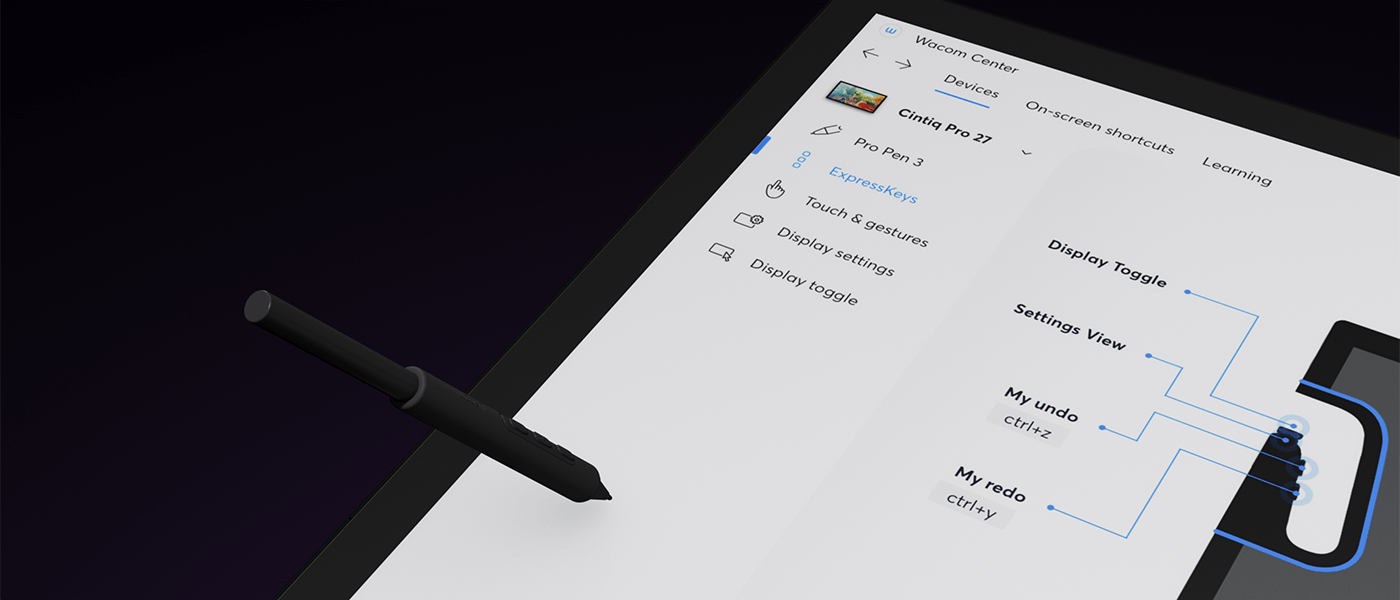
Your great taste doesn’t stop at your creations, it expands to the way you create too. The all new driver interface provides many new options to speed up and simplify your creative experience, including customizable pen gestures and on-screen pen and touch controls. With this, you have a degree of control never before seen on a Wacom pen display.

BACK:

Wacom is striving to make our products more environmentally friendly. From product design materials to packaging, the new generation uses recycled materials wherever possible to produce the most sustainable Cintiq Pro ever. Because crafting better worlds starts with caring for ours.


What is included
- Wacom Cintiq Pro 17
- Wacom Cintiq Pro Easy Stand, incl. VESA screw, wrench
- Wacom Pro Pen 3 with 2 extra grips, 3 extra button plates, and a balance piece
- Detachable pen tray with 10 replacement nibs (5 standard, 5 felt) and nib removal tool
- USB-C cable (1.8 m)
- AC adaptor
- Power cord (1.0 m)
- Quick start guide
- Regulation sheet

Using the Wacom Cintiq Pro
Wacom Cintiq Pro is meticulously crafted with the exacting demands of creative professionals in mind.
It’s engineered to provide professionals with an immersive, pleasurable, and natural interaction for digital content creation.
Widely embraced by professionals in various sectors, including graphic design, digital illustration, photography, photo editing, 3D modeling, animation, post-production, fashion, and product design, Wacom Cintiq Pro stands as the preferred solution.

The Wacom Cintiq Pro 17 is Wacom’s current mid-range professional pen display — a 17.3-inch 4K screen that sits between the portable Pro 16 and the large-format Pro 27 in both size and capability. It is part of Wacom’s refreshed Cintiq Pro line, designed to address the feedback that preceded it: more screen than the Pro 16 without the full desk commitment of the 27. The result is a display that professional artists and designers can use at a fixed workstation or move between locations — it is not as portable as the Pro 16, but it is considerably more manageable than a 27-inch studio display. The DTH172K0B includes the Wacom Cintiq Pro Easy Stand in the box, which provides a stable, adjustable base from day one without a separate accessory purchase.
What the Pro 17 Delivers That the Pro 16 Does Not
The jump from 16 to 17.3 inches sounds modest on paper but represents a noticeably larger active drawing area — more canvas space for complex compositions, more room for tool palettes without covering the artwork, and a more comfortable extended drawing experience for professionals who work for long uninterrupted sessions. The Pro 17 also steps up to 4K resolution at 17.3 inches, which delivers a higher pixel density than the same resolution on the larger Pro 27 — meaning finer detail, sharper line work, and more precise text rendering at any zoom level. Like the Pro 16, the Pro 17 uses a fully laminated display, eliminating the gap between the glass and the panel so the pen appears to touch the image exactly where it registers. USB-C connectivity handles power, video, and data through a single cable on compatible computers.
Who the Cintiq Pro 17 Is For in the Middle East
The Pro 17 occupies a specific sweet spot in the professional range that suits a well-defined group of creatives. Senior illustrators and concept artists who found the Pro 16 limiting but want to retain flexibility — the ability to move the display between a studio desk, a home workstation, or a client presentation setup — find the Pro 17 the practical answer. Gaming and entertainment studios across the Middle East that equip senior artists individually, rather than in uniform lab rows, specify the Pro 17 for roles where the quality of the drawing tool directly affects the quality of the output. Photographers and retouchers who need colour-accurate large-format viewing for detailed mask and dodge work use it for the display quality. Architecture and product design studios that blend CAD output with hand-rendered concept development find the 17.3-inch canvas balances detail and overview without requiring a dedicated large monitor setup.
Cintiq Pro 17 vs Cintiq Pro 16 — Is the Step Up Worth It
The Pro 16 and Pro 17 share the same fundamental technology — both are fully laminated 4K pen displays with the same pen performance and USB-C connectivity. The differences are size and the included stand. The Pro 17’s 17.3-inch screen gives approximately 17% more active drawing area than the Pro 16’s 15.6 inches, which is a consistent benefit across every drawing session. The Pro 17 also includes the Easy Stand in the box where the Pro 16 requires a separate stand purchase for comfortable upright use. For artists who spend most of their time at a single workstation and find themselves wanting more canvas room on the Pro 16, the Pro 17 is the direct upgrade. For artists who prioritise portability above all else, the Pro 16 remains the lighter, more travel-friendly option.
Cintiq Pro 17 vs Cintiq Pro 27 — Focused Tool vs Studio Centrepiece
The Pro 27 is a different category of device — a 27-inch 4K studio display that is built to anchor a dedicated creative workstation and stay there. The Pro 17 is for artists who want professional-grade display quality in a format that does not dominate the desk or require a fixed permanent setup. If your work demands the maximum canvas space available and you have the desk to accommodate it, the Pro 27 is the right investment. If you value high display quality in a more manageable form factor — or if you need the display to move between settings — the Pro 17 delivers the same core technology in a proportionally smaller package. For studios equipping multiple individual workstations at different seniority levels, the Pro 17 and Pro 27 often appear in the same environment serving different roles.