Wacom DTU-1031AX Pen Display
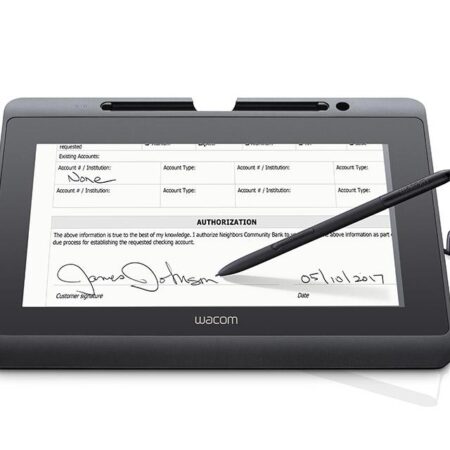
The Wacom DTU-1031AX is a signing display with a 10.1-inch screen, designed so the signer can read the document on screen. It is the ruggedised variant in the DTU-1031 family, built for busy public-facing counters.
- Screen Size: 10.1 in
- Display Type: Colour LCD
- Pressure Levels: 1024
- Interface: USB
- Cover Glass: Hardened cover glass
- Encryption: Supported
- Best For: Public-facing counters where the document must be read on screen
Streamline your workflow and transition to a seamless, paperless environment with the Wacom DTU-1031AX Pen Display. Designed for customer-facing document workflows, this 10.1-inch interactive display lets people read, annotate and sign full-size documents on screen across banking, insurance, healthcare, hospitality and government service counters.
The display can be laid flat on a counter or tilted up to 18° for a comfortable viewing and signing angle, and it connects to a Windows or Mac computer through a single Y-split USB-A cable that carries video, data and power — no separate power supply to find room for.
The Wacom DTU-1031AX is the ideal solution where the signer needs to review the document, not just add a signature. The application software of the Signature Set is sign pro PDF. The software allows electronic registration of handwritten signatures and their integration into PDF documents. The software not only records the signature image that is displayed on the tablet or screen, but also the non-visible biometric data such as pressure, travel and speed. Subsequently, the document and the signature can not be modified and are protected securely. Then, the document can be saved, printed or sent.
What’s included with Wacom DTU-1031AX
The Wacom DTU-1031AX package includes everything needed to connect the pen display to a compatible computer and start setting up your digital signature workflow.
- Wacom DTU-1031AX Pen Display
- Cordless and battery-free digital pen
- Y-split USB-A cable
- Quick Start Guide
- Pen tether
Read, Annotate and Sign Full Documents
- The DTU-1031AX is designed for organisations whose documents need to be read before they are signed. Its 10.1-inch 1024 x 600 screen shows a full-size page, so a customer can scroll through terms, add annotations and sign without printing anything.
- With 512 levels of pen pressure sensitivity, the display captures the signature detail needed for biometric verification. The battery-free cordless pen uses Wacom EMR technology, helping reduce maintenance and eliminate the need for batteries.
Built for Secure Electronic Signatures
- Security is a key part of the Wacom DTU-1031AX design. The display includes built-in AES 256 and RSA 2048 encryption, helping keep signing transactions secure from the moment the signature is captured.
- Its flat or tilted mounting options and counter-friendly footprint make it suitable for branch, reception and service-desk environments where both physical placement and digital security matter.
Frequently Asked Questions
What is the Wacom DTU-1031AX used for?
Reading, annotating and signing full-size documents on screen. Its 10.1-inch 1024 x 600 display lets a customer scroll through terms, add annotations and sign without anything being printed.
What security does the DTU-1031AX offer?
Built-in AES 256 and RSA 2048 encryption, protecting the signing transaction from the moment the signature is captured. That is the main reason it is specified for banking and government counters.
Can the display be tilted?
Yes. It lies flat on a counter or tilts up to 18 degrees for a comfortable viewing and signing angle, which matters when the same unit is used by customers of very different heights.
What does it need to connect?
A single Y-split USB-A cable carrying video, data and power to a Windows or Mac computer — no separate power supply required.
How does it compare with the DTU-1141B?
Both are 10.1-inch signing displays. The DTU-1141B runs Full HD 1920 x 1080 against 1024 x 600 here, so it renders small print more clearly. The DTU-1031AX is the more economical choice where that resolution is not essential.
Are signatures captured on it legally valid in the UAE?
Yes. Electronic signatures are recognised under the UAE Electronic Transactions and Trust Services Law (Federal Decree-Law No. 46 of 2021). Signing displays support compliance by capturing the biometric characteristics of the signature alongside the visible mark.
How do developers integrate it?
Through the Wacom Ink SDK for signature for capture inside your own application, or the sign pro PDF API where you want complete PDFs signed from an existing CRM, ERP or document system. If you would rather avoid development entirely, the sign pro PDF application handles it as installed software.
How much does the Wacom DTU-1031AX cost in the UAE?
Ask us for a current quote. Pricing depends on quantity, whether a sign pro PDF licence is bundled and any integration work, and we price hardware, software and development as one figure with UAE delivery and local support.
Need this configured for your workflow?
Tell us what you sign, how often, and which system it lives in. We will specify the hardware, software and integration — with UAE pricing.