
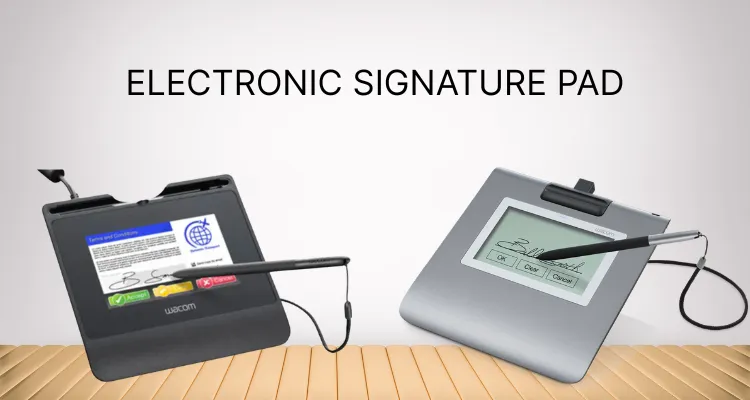
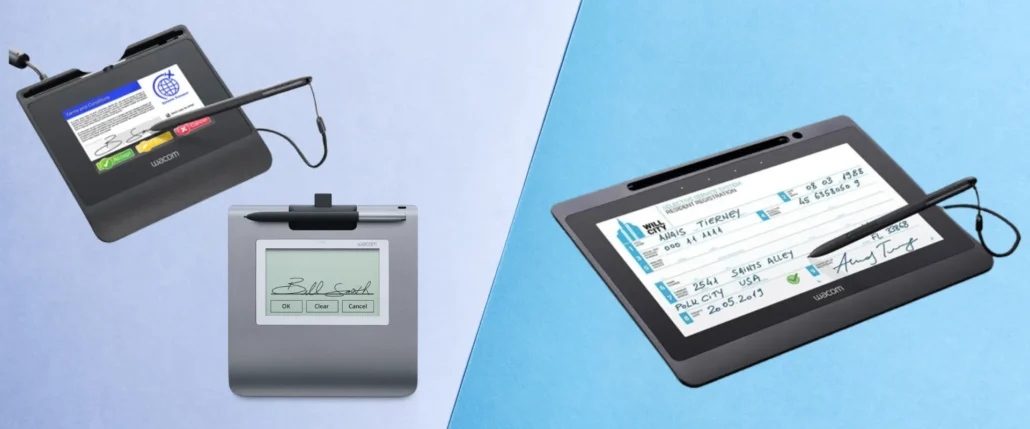
Wacom electronic signature pads are revolutionizing the way businesses handle document signing. These devices capture handwritten signatures digitally, offering a seamless transition from paper to digital.
They are known for being very accurate and reliable. This makes them a popular choice in banking and healthcare. With Wacom’s signature pads, businesses can streamline workflows and reduce paper usage.
These pads are not just about capturing signatures; they integrate smoothly with various software applications. This ensures a user-friendly experience for both signers and administrators.
Wacom’s signature pads are part of a broader ecosystem of digital tools. They complement Wacom pen displays and drawing tablets, providing a complete digital workflow solution.
Wacom’s signature pads provide a safe and easy way for professionals and businesses to handle electronic documents.
Summary
Wacom electronic signature pads securely capture handwritten signatures with high accuracy, helping organizations transition from paper to digital workflows. They combine pressure-sensitive input, encryption, and broad software compatibility for seamless integration and strong data protection. A variety of models, like the STU-300B, STU-430, and STU-540, suit different environments. These models are different from Wacom pen displays and tablets made for creative work. These tools are used in banking, healthcare, retail, government, legal, and education. They help with compliance and are easy to set up. You should choose them based on how long they last, the features you need, and if they work with your system.
What Are Wacom Electronic Signature Pads?
Wacom electronic signature pads are advanced devices engineered to capture signatures digitally. These pads are specifically designed to replace the traditional pen and paper method.
They offer a digitized approach for signing documents securely and efficiently. Wacom signature pads are widely used in various industries, providing a reliable solution for businesses.
These devices come equipped with pressure-sensitive technology. This feature allows for a natural writing experience, replicating the feel of signing on paper.
Key characteristics of Wacom electronic signature pads include:
- High accuracy in capturing handwritten signatures
- Compatibility with Windows and Mac operating systems
- User-friendly integration with various software applications
These pads offer a modern take on document signing, emphasizing ease of use and high precision. By utilizing Wacom’s technology, businesses can ensure a smooth transition to digital documentation.
Key Features and Benefits of Wacom Signature Pads
Wacom electronic signature pads are packed with features that set them apart. One of their most notable features is their durability. Designed to withstand heavy daily use, these pads are built to last, ensuring a great return on investment.
The precision and accuracy of Wacom signature pads are unmatched. They capture every stroke with high fidelity, making electronic signatures look just as authentic as ink on paper. This precision is a hallmark of Wacom products.
Efficiency is another crucial benefit. These pads streamline workflows, significantly reducing the reliance on paper documents. This reduction leads to both cost savings and a smaller environmental footprint, making them an eco-friendly choice.
Wacom signature pads are compatible with various software and hardware systems. This feature allows for easy integration into existing setups, minimizing any potential disruptions to work processes.
Key benefits of Wacom signature pads include:
- Enhanced data security with encrypted transmissions
- User-friendly interfaces that require minimal training
- Support for multiple signature formats and standards
These features together provide a compelling case for businesses to adopt Wacom electronic signature pads. They enhance productivity while maintaining the highest security and quality standards.
How Wacom Signature Pads Work: Technology and Integration
Wacom electronic signature pads are built on advanced technology. At their core is pressure-sensitive technology, which mimics the sensation of writing on paper. This feature ensures each stroke feels natural and smooth, enhancing the user experience.
Integration with existing systems is seamless. Wacom pads offer plug-and-play USB connectivity, which simplifies the setup process. This aspect ensures that the devices are ready to use with minimal configuration required, saving valuable time.
The technology behind Wacom signature pads also supports security. Data encryption ensures that captured signatures remain confidential and tamper-proof. This aspect is crucial for industries like banking and healthcare where data protection is paramount.
Key integration features include:
- Compatibility with Windows and Mac operating systems
- Support for various document management systems
- Ability to be integrated with cloud-based applications
These features demonstrate the versatility and reliability of Wacom signature pads. They make transitioning from paper to digital workflows straightforward and secure, ensuring minimal disruption to business operations.
Popular Wacom Electronic Signature Pad Models
Wacom offers a diverse range of electronic signature pads to suit various business needs. Each model is designed to provide a seamless signing experience while ensuring high security and reliability.
The STU-300B is a compact model, ideal for businesses with limited space. Its small footprint does not compromise on functionality, offering a robust solution for signature capture.
For those requiring a larger display, the STU-430 offers enhanced visibility with a 4.5-inch screen. This model is well-suited for retail or customer-facing applications, where clarity is essential.
The STU-540 stands out with its color display, adding a professional touch to any signing process. It is designed for environments where a premium look and feel are important.
Some popular models include:
- STU-300B: Compact, with essential features.
- STU-430: Mid-size screen for better visual interaction.
- STU-540: Full-color display for an elevated experience.
Each model caters to different operational requirements, ensuring businesses can find a perfect fit. By understanding the features of each model, you can choose the best Wacom electronic signature pad for your setting.
Wacom DTU pen displays offer a versatile range of digital drawing and interactive display solutions for professionals and businesses. From compact models to larger screens with advanced features, there’s a DTU display to suit every creative or workflow need. Explore the full range of Wacom DTU pen displays to find the perfect fit for your requirements. [Click to explore]
Wacom Signature Pads vs. Wacom Pen Displays and Drawing Tablets
Wacom electronic signature pads, pen displays, and drawing tablets serve different purposes. Understanding these distinctions will help you select the right tool for your needs.
Wacom signature pads are tailored for secure electronic signing. They focus on capturing signatures digitally with high accuracy. These devices are compact, making them ideal for business environments requiring frequent document signing.
In contrast, Wacom pen displays, like the Cintiq series, are designed primarily for digital art creation. These devices allow artists to draw directly on the screen, providing a natural drawing experience similar to paper.
Wacom drawing tablets, such as the Intuos series, cater to both beginners and professionals. They serve as versatile tools for a wide range of digital art applications.
Here are the key differences:
- Signature Pads: Secure, compact, and ideal for document signing.
- Pen Displays: Designed for artists with display input.
- Drawing Tablets: For digital art, without built-in displays.
While all are reputable for quality, their specific functionalities differ greatly. Selecting between them depends on your primary use case, whether for signing, drawing, or both.
Use Cases: Industries and Applications
Wacom electronic signature pads are transformative across many industries. Their adoption is widespread due to the efficiency they bring.
The banking sector utilizes these pads to streamline customer transactions. They enable secure signing of documents while reducing the use of paper, which saves costs.
Healthcare facilities find them invaluable for patient consent forms. They offer a reliable way to capture signatures digitally, improving record-keeping processes.
Retailers benefit from these devices during point-of-sale interactions. By replacing paper receipts with digital signatures, they enhance the customer experience and decrease paper waste.
Other applications include:
- Government Services: Facilitating fast public service transactions.
- Legal Firms: Secure client contract signings.
- Educational Institutions: Student forms and administrative paperwork.
These signature pads are versatile, meeting diverse needs across various business landscapes. They can easily integrate with existing workflows, providing seamless transitions to digital processes. This adaptability makes them an essential tool for modern business operations.
Security, Compliance, and Data Protection
Security is paramount when using Wacom electronic signature pads. These devices ensure that signatures are encrypted and tamper-proof, safeguarding sensitive data.
Wacom pads support various compliance standards. They include features to meet industry regulations, making them trustworthy solutions for businesses.
The devices capture biometric data, adding an extra security layer. This feature ensures the authenticity of every signature and enhances data protection measures.
Key security benefits include:
- Encrypted Signature Storage
- Biometric Capture
- Tamper-proof Technology
Ensuring robust security and compliance, Wacom signature pads provide confidence in electronic document management. For businesses, this translates into improved trust with clients and partners alike.
How to Choose the Right Wacom Signature Pad for Your Needs
Choosing the right Wacom signature pad involves assessing your specific needs.
Consider the volume of signatures your business requires daily.
Evaluate the environments in which the pads will be used. Some models are better suited for high-traffic or outdoor scenarios due to their durability and portability.
Key factors to consider include:
- Durability and Portability
- Required Features
- Integration with Current Systems
Assessing these needs helps ensure you select a device that aligns with your business operations. Wacom provides solutions tailored to a variety of professional requirements, whether in offices or on the go.
Setup, Integration, and User Experience
Setting up Wacom electronic signature pads is straightforward. They are designed for easy connection, usually via USB, ensuring quick deployment.
Integration with existing workflows is seamless. These pads are compatible with many software applications, allowing for efficient transitions from traditional methods.
Key aspects that contribute to a smooth user experience include:
- Simple Setup Process
- Seamless Workflow Integration
- Intuitive User Interface
The easy-to-use design reduces the learning curve. This helps both signers and administrators adapt quickly. Wacom’s solutions are crafted to enhance day-to-day productivity seamlessly.
Frequently Asked Questions about Wacom Electronic Signature Pads
Wacom electronic signature pads often raise common queries, especially for those new to this technology. Many potential users wonder about their compatibility and ease of use.
Concerns about the integration process and software requirements are frequent. Luckily, Wacom pads are designed to be versatile and adaptable to multiple systems.
Here are some frequently asked questions:
- Are Wacom signature pads compatible with Mac and Windows?
- Is it possible to customize the signature pads with company logos?
- How secure are Wacom electronic signature pads?
These questions address key concerns and reassure users about the usability and security of Wacom’s devices.
Conclusion: Are Wacom Electronic Signature Pads Right for You?
Deciding on Wacom electronic signature pads depends on your specific needs. These pads offer high accuracy and intuitive usability, making them ideal for businesses seeking efficient signing solutions.
Their seamless integration with existing systems and robust security features ensures a reliable signing experience. Whether you’re aiming to streamline operations or enhance client interactions, Wacom signature pads provide a modern, paperless signing solution. Evaluate your workflow and compatibility requirements to determine if these pads align with your business objectives.