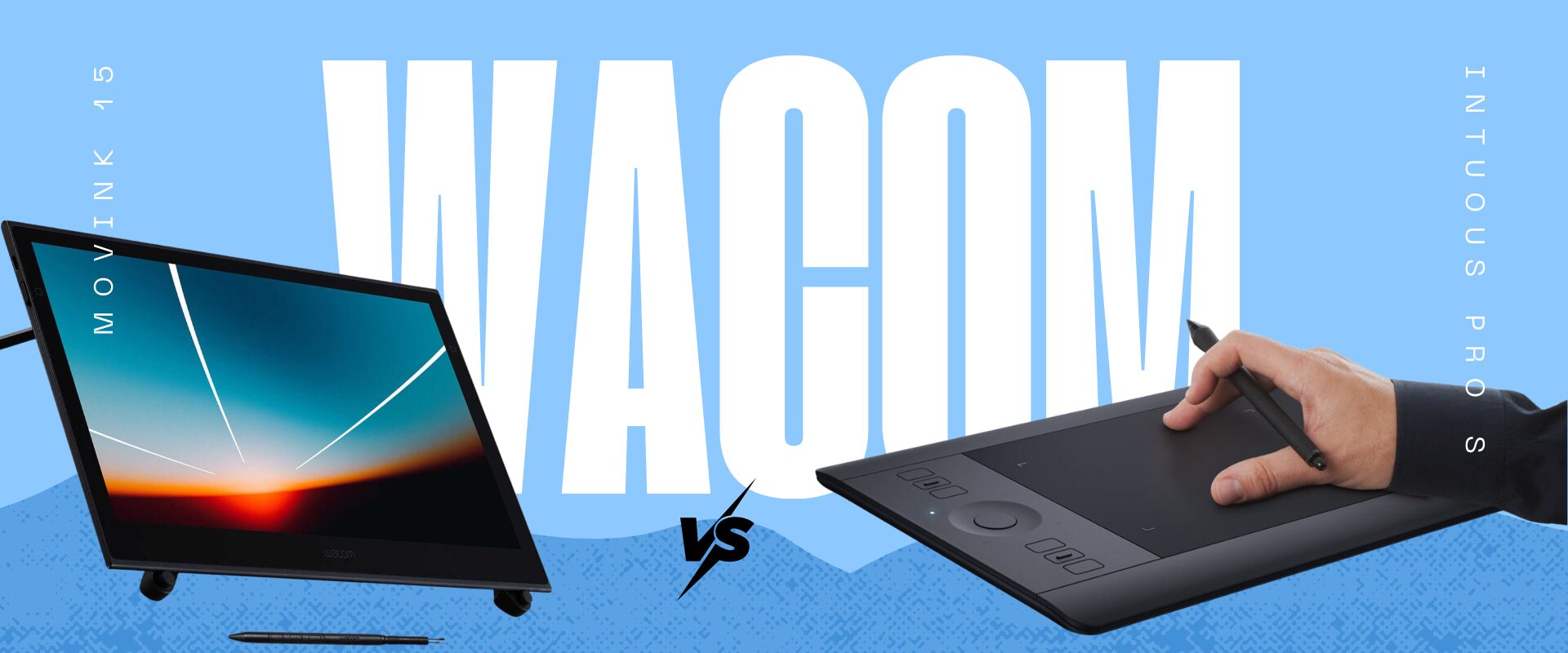
Choosing between a portable pen display and a compact pen tablet shapes how you work, travel, and create across every project. This comparison breaks down the Wacom Movink 13 and Wacom Intuos Pro Small PTH460K0B across every specification and workflow factor that matters, helping you decide which device fits your creative setup in the UAE.
What Is the Wacom Movink 13?
The Wacom Movink 13 is a portable OLED pen display designed for creative professionals who need to draw, illustrate, and design directly on screen while working away from their primary workstation. Built by Wacom, the industry standard in digital pen technology, the Movink 13 represents a new category of ultra-portable pen displays that bridge the gap between full-size Cintiq studio monitors and tablet-only input devices. It connects to a host computer, laptop, or compatible mobile device via a single USB-C cable, making it a true companion display for professionals who move between studios, client meetings, and remote locations.
The Movink 13 does not operate as a standalone computer. It requires a host device for processing power, which means your laptop or desktop handles all the heavy lifting while the Movink serves as a high-fidelity drawing surface. This design philosophy keeps the device extraordinarily thin and light while delivering colour accuracy and pen responsiveness that rival much larger and heavier pen displays.
What Is the Wacom Intuos Pro Small PTH460K0B?
The Wacom Intuos Pro Small PTH460K0B is a professional-grade pen tablet built for creatives who prefer working with a separate monitor rather than drawing directly on a display surface. With an active drawing area of 224 by 148 millimetres, it provides a compact but capable input surface that maps precisely to your screen. The Intuos Pro Small connects via USB or Bluetooth, giving users the flexibility of wired reliability or wireless convenience.
Like all pen tablets in Wacom’s professional range, the Intuos Pro Small relies on your existing monitor for visual feedback. You draw on the tablet surface while watching the results appear on your connected display. This indirect input method has a learning curve, but many professionals prefer it because it eliminates the neck strain associated with looking down at a pen display for extended sessions. The Intuos Pro Small also supports multi-touch gestures, allowing you to zoom, rotate, and navigate your canvas with intuitive finger movements alongside pen input.
Display Technology and Visual Performance
The most significant difference between these two devices is fundamental. The Movink 13 features a 13.3-inch OLED display running at 1920 by 1080 Full HD resolution with a refresh rate of 50 to 60 Hz. The OLED panel delivers deep blacks, exceptional contrast ratios, and vibrant colour reproduction that flat-panel LCD pen displays struggle to match. For colour-critical work, the Movink 13 covers 100 percent of the DCI-P3 colour space, 95 percent of Adobe RGB, and carries Pantone Validation certification. This means what you see on the Movink screen closely matches what will appear in print or on calibrated production monitors.
The Intuos Pro Small has no display whatsoever. This is not a limitation in the traditional sense but rather a different design philosophy. When you use the Intuos Pro Small, your colour accuracy depends entirely on whatever monitor you connect to your computer. If you pair it with a high-end colour-calibrated display, your colour fidelity can match or exceed what the Movink offers. However, if you are working on a standard laptop screen during travel, the visual experience will be limited by that screen’s capabilities rather than the tablet’s.
Key visual performance highlights of the Movink 13:
- OLED technology with true blacks and infinite contrast ratio for illustration and photo editing
- Full HD resolution at 1920 by 1080 across a 13.3-inch diagonal, providing sharp detail for precision work
- 100 percent DCI-P3 and 95 percent Adobe RGB coverage meeting professional colour standards for print and digital media
- Pantone Validated certification ensuring colour consistency across creative workflows
- 50 to 60 Hz refresh rate providing smooth cursor tracking during drawing and painting
- Direct on-screen drawing eliminating the disconnect between hand movement and visual feedback
Pen Technology and Drawing Experience
Both devices use Wacom’s professional pen technology with 8192 levels of pressure sensitivity, ensuring precise control over line weight, opacity, and brush dynamics. The Movink 13 ships with the Pro Pen 3, which also supports 60 degrees of tilt recognition. Tilt sensitivity allows the pen to respond to the angle at which you hold it, mimicking the behaviour of traditional media such as charcoal, pencil, and airbrush tools. Users who have tested the Pro Pen 3 on the Movink frequently compare the drawing feel to using Wacom’s larger Cintiq Pro displays, praising the natural paper-like texture and low parallax between the pen tip and the on-screen cursor.
The Intuos Pro Small ships with the Pro Pen, also featuring 8192 pressure levels. While the core pressure sensitivity specification matches the Movink, the drawing experience differs significantly because you are working on an opaque tablet surface rather than directly on a display. The pen glides over the tablet’s textured surface, and the cursor responds on your connected monitor. Many seasoned digital artists actually prefer this workflow because it preserves the natural wrist position and allows them to maintain eye-level contact with their monitor, reducing fatigue during marathon sessions.
From a community feedback perspective, users consistently praise the Pro Pen 3 on the Movink for feeling premium and responsive, while Intuos Pro Small users value the reliability and familiarity of the Pro Pen in a compact form factor. The key differentiator is not the pen itself but where you see your strokes appear — either directly under the pen tip on the Movink or on a separate screen with the Intuos Pro.
Build Quality and Portability
The Wacom Movink 13 is remarkably thin at just 4 millimetres and weighs only 420 grams. For context, that is lighter than most tablets and thinner than many smartphones. This ultra-slim profile allows the Movink to stack directly on top of a laptop keyboard, essentially transforming your laptop into a pen display workstation. The flexible USB-C cable maintains a clean setup without rigid connectors that could stress the device during transport. The build is engineered specifically for mobile creatives who need professional-grade tools without the bulk of traditional pen displays.
The Wacom Intuos Pro Small also prioritises portability, though in a different way. Without a display to protect, the tablet is inherently more durable for tossing into a bag. The active area of 224 by 148 millimetres keeps the overall footprint compact, and the absence of a glass display means less anxiety about screen damage during travel. The Intuos Pro Small is a device you can confidently pack alongside a laptop without worrying about scratches or cracks.
Both devices serve the mobile professional, but the Movink demands slightly more care due to its OLED display surface, while the Intuos Pro Small is inherently more rugged for rough-and-tumble travel conditions.
Connectivity and Compatibility
The Movink 13 connects through a single USB-C cable that handles video output, power delivery, and data control simultaneously. It requires DisplayPort Alt Mode support from the host device, which is standard on most modern laptops and many Android devices. The Movink is compatible with Windows, macOS, Android, and ChromeOS, making it one of the most versatile pen displays in Wacom’s lineup. However, there is no wireless display connection option, which some users have noted as a limitation when they want a completely cable-free workspace.
The Intuos Pro Small connects via USB for a wired connection or Bluetooth for wireless operation. Bluetooth connectivity allows you to work without any cables, which is a genuine advantage for users who value a clean desk or need maximum flexibility in how they position the tablet relative to their screen. The tradeoff is that Bluetooth can occasionally introduce minimal latency compared to a wired connection, though most professionals find it negligible for their workflows.
For UAE-based creatives working in coworking spaces across Dubai or collaborative studios in Abu Dhabi, the Movink’s single-cable solution simplifies setup dramatically, while the Intuos Pro Small’s Bluetooth option offers untethered freedom.
Who Should Buy the Wacom Movink 13 in the UAE?
The Movink 13 is built for illustrators, concept artists, photographers, and designers who frequently work outside a fixed studio environment and need to draw directly on screen. If you split your time between a home office and client locations, or if you regularly work from cafes and coworking spaces across Dubai, the Movink lets you carry a professional pen display experience in a sleeve barely thicker than a magazine. Photographers doing on-location retouching will appreciate the OLED colour accuracy and the ability to make precise selections and adjustments directly on the image. Digital painters and illustrators who find the disconnect of indirect tablet input frustrating will immediately benefit from drawing directly on the Movink’s surface.
The Movink also suits creative directors and art leads who need to sketch quick feedback during client presentations or team reviews. Its compatibility with Android and ChromeOS extends its utility beyond traditional desktop operating systems, making it useful for professionals who work across multiple device ecosystems.
Who Should Buy the Wacom Intuos Pro Small PTH460K0B in the UAE?
The Intuos Pro Small is the right choice for professionals who already have a high-quality monitor and prefer the ergonomic advantages of indirect drawing. Graphic designers working long hours in Abu Dhabi agencies, retouchers who spend full days in Photoshop, and UI designers who need precise cursor control without looking away from their primary display will find the Intuos Pro Small efficient and comfortable. The compact form factor makes it ideal as a secondary input device that sits alongside a keyboard, and the Bluetooth connectivity keeps your workspace tidy.
This device also makes sense for professionals who travel but do not need a second display. If your laptop screen is already colour-calibrated and sufficient for your work, adding a pen tablet rather than a pen display saves weight and eliminates the risk of screen damage. Budget-conscious freelancers and students pursuing creative careers in the UAE will also find the Intuos Pro Small an accessible entry point into Wacom’s professional ecosystem.
Wacom Movink 13 vs Intuos Pro Small PTH460K0B: Which One Is Right for Your Use Case?
Choosing between these two Wacom devices ultimately depends on whether you need to see your work directly under the pen tip or whether you are comfortable with indirect input through a separate monitor. Both are professional tools, but they serve distinctly different workflow preferences and creative environments.
|
Feature |
Wacom Movink 13 | Wacom Intuos Pro Small PTH460K0B |
| Model / SKU | Movink 13 | PTH460K0B |
| Core Technology | OLED Pen Display | Pen Tablet (no display) |
| Screen Size | 13.3 inches | No display |
| Resolution | 1920 x 1080 Full HD | Not applicable |
| Colour Accuracy | 100% DCI-P3, 95% Adobe RGB, Pantone Validated | Dependent on connected monitor |
| Pen Technology | Pro Pen 3 — 8192 pressure levels, 60° tilt | Pro Pen — 8192 pressure levels |
| Touch Support | Yes | Yes, with multi-touch gestures |
| Express Keys / Shortcuts | 2 customisable buttons | Multi-touch gesture navigation |
| Connectivity | Single USB-C with DisplayPort Alt Mode | USB and Bluetooth |
| Best For | Mobile creatives needing direct on-screen drawing with professional colour |
Desktop and travel setups using a separate monitor with compact pen input |
The Movink 13 is the clear choice for any creative professional whose workflow demands direct on-screen interaction and who values colour accuracy during mobile work. Users who have adopted the Movink praise its ability to transform any laptop into a Cintiq-like experience, with OLED blacks and contrast that make illustration and photo work feel premium even on the go. The 420-gram weight and 4-millimetre thickness mean it adds virtually no burden to your travel kit.
The Intuos Pro Small is the smarter pick for professionals who have already invested in a quality desktop monitor and prefer working at eye level without looking down at a screen. Community feedback consistently highlights that the Intuos Pro Small is a reliable workhorse for daily production work, and its Bluetooth connectivity means one less cable on your desk. For long-session retouching and design work, the ergonomic advantage of keeping your gaze forward rather than down at a display is significant and often underestimated by those who have not experienced both workflows. The smaller active area can feel limiting for large canvas work, but most users adapt quickly by adjusting sensitivity settings and mapping ratios.
Wacom Movink 13 Price in UAE and Where to Buy
The Wacom Movink 13 and the Intuos Pro Small PTH460K0B are both available with us, Pricing is available on request along with current availability, bundle options, and full UAE warranty support. Whether you are purchasing for a single workstation or outfitting an entire creative team, our team can advise on the right configuration for your needs.
Always purchase from an authorised seller to ensure valid UAE warranty and after-sales support. This protects your investment and guarantees access to genuine accessories, software bundles, and local service should you ever need assistance with your device.
Key Takeaways
- The Wacom Movink 13 delivers a professional OLED pen display experience in a device thinner than most smartphones, making it the most portable direct-drawing solution Wacom has ever produced.
- Its 100 percent DCI-P3 colour coverage and Pantone Validation give creative professionals confidence that their on-screen colours are production-accurate, even when working remotely.
- The Wacom Intuos Pro Small PTH460K0B remains a dependable choice for professionals who prefer indirect drawing on a compact pen tablet paired with their own calibrated monitor.
- Both devices share 8192 levels of pressure sensitivity, ensuring that pen responsiveness is professional-grade regardless of which form factor you choose.
- The Movink requires a host device with USB-C DisplayPort Alt Mode, while the Intuos Pro Small offers the flexibility of both USB and Bluetooth connections.
- Touch support is available on both devices, though the Intuos Pro Small’s multi-touch gestures provide canvas navigation without lifting the pen.
- For UAE-based creatives working across multiple locations in Dubai and Abu Dhabi, the decision ultimately comes down to whether direct on-screen drawing or ergonomic indirect input better serves your daily workflow.
Frequently Asked Questions
What is the Wacom Movink 13 price in UAE?
Pricing for the Wacom Movink 13 is available on request through etopme.ae. The team can provide current pricing along with information on availability and any bundle options that may be active. Contacting etopme.ae directly ensures you receive accurate and up-to-date pricing for the UAE market.
Where can I buy the Wacom Movink 13 in Dubai?
You can enquire about the Wacom Movink 13 through wacomme.ae, which serves customers across Dubai, Abu Dhabi, and the wider UAE. Our expert team can assist with product selection, availability confirmation, and delivery arrangements to your location.
Does the Wacom Movink 13 come with UAE warranty?
Yes, when purchased through an authorised channel such as etopme.ae, the Wacom Movink 13 comes with full UAE warranty coverage. This ensures access to local support, genuine replacement parts, and after-sales service for the duration of the warranty period.
Is the Wacom Movink 13 better than the Intuos Pro Small?
The Movink 13 is better for professionals who need direct on-screen drawing with accurate colours while working on the move. The Intuos Pro Small is better for those who prefer indirect input with a separate high-quality monitor and value wireless Bluetooth connectivity. Neither is universally superior because they serve different creative workflows and ergonomic preferences.
What is included in the box with the Wacom Movink 13?
The Wacom Movink 13 typically includes the OLED pen display, the Pro Pen 3, replacement nibs, a USB-C cable, and documentation. For the most accurate and current box contents, it is best to confirm with etopme.ae as configurations and included accessories may vary by region.
Can I use the Wacom Movink 13 with Android devices?
Yes, the Movink 13 is compatible with Android devices that support USB-C DisplayPort Alt Mode. It also works with Windows, macOS, and ChromeOS, making it one of the most cross-platform pen displays available. Verify that your specific Android device supports the required display output before purchasing.
Does the Wacom Intuos Pro Small work wirelessly?
Yes, the Intuos Pro Small PTH460K0B supports Bluetooth connectivity, allowing fully wireless operation alongside its USB wired option. This makes it convenient for clean desk setups and flexible positioning relative to your monitor, though a wired connection may provide marginally lower latency for the most demanding precision tasks.