
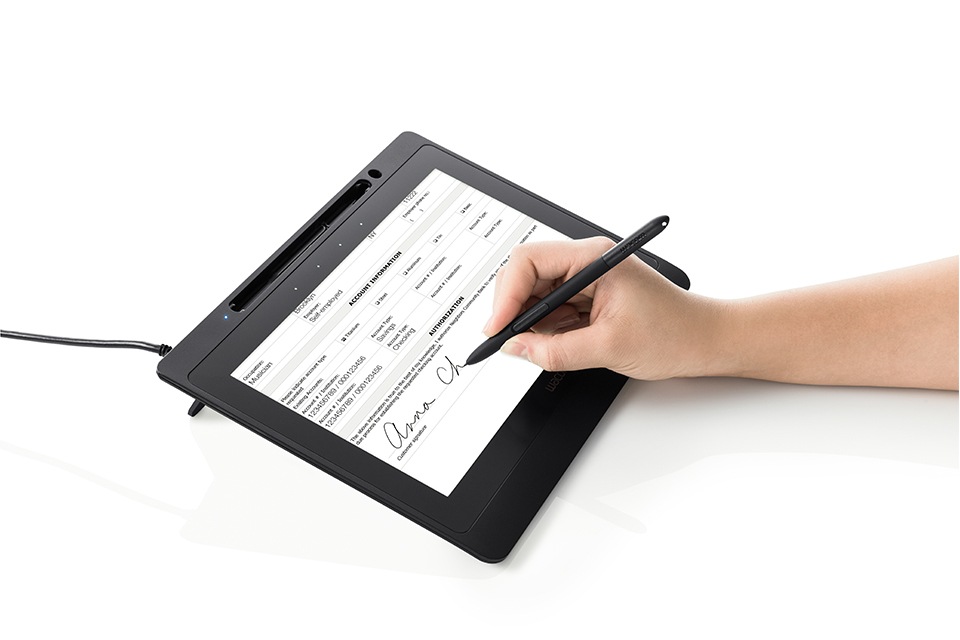
Signing a contract in person, without the paper
When a customer has to sign contract paperwork at your counter, two things matter: they read what they are agreeing to, and you keep a record that holds up later. Paper does the first badly and the second expensively. Printed contracts get signed on the last page without being read, then scanned, filed, couriered and stored for years.
A pen display changes the routine. The customer reads the whole contract on screen, initials and signs it with a pen, and the signed PDF is locked and archived the moment they put the pen down. This guide covers how that works, what the signed file contains, where UAE law stands, and what you need to set it up at a branch.
Remote e-signing vs signing at the counter
Most results for “sign a contract online” describe remote tools: you email a link, the other party clicks or types a name, and the platform keeps an audit trail. That works when the signer is somewhere else.
Many UAE contracts are still signed face to face. The customer is standing at a bank branch, a car rental desk, a telecom store, a real estate office or a hospital admissions counter, often with an Emirates ID or passport in hand for the identity check. In that moment there is no reason to send a link. What you need is a way for them to read and sign in front of you, with a handwritten signature that carries more evidence than a typed name.
That is the job of a Wacom pen display running signing software such as Wacom sign pro PDF. The customer signs the way they always have, with a pen, and the paper drops out of the process.
What the signer needs to see before they sign
The device choice comes down to one question: does the customer read the contract on the same screen they sign on?
- Yes, the full document is read and signed on one screen. Use a pen display such as the Wacom DTU-1141B. Its 10.1-inch Full HD (1920 x 1080) screen shows a full contract page at a readable size, and the customer scrolls, initials and signs in place.
- No, the document is shown on a staff monitor or on paper and only the signature is captured. A compact signature pad such as the Wacom STU-430 or STU-540 is smaller and lower cost.
For contracts with terms the customer should genuinely review, such as loan agreements, tenancy contracts or rental agreements with damage clauses, read-and-sign on one screen removes the usual “sign here, here and here” without context. For a full side-by-side of the two device types, see our signature pad vs signature display buying guide.
Step by step: a full contract signed on a pen display
This is the typical flow with Wacom sign pro PDF on a Windows workstation and a DTU-1141B on the counter.
1. Prepare the contract as a PDF with signature fields
Signature and initial fields can be placed in the template in advance. sign pro PDF reads embedded text tags, or your system can pass the fields through the sign pro PDF API, including the signer name, the reason for signing, the page and position, and whether a field is required.
2. Open the document on the customer-facing screen
The staff member opens the PDF, and sign pro PDF can open it directly on the connected Wacom pen display. The DTU-1141B works as a second monitor, so the staff PC keeps its own screen for other work.
3. The customer reads and fills in
The customer scrolls through every page, fills form fields and initials where required. Fields marked as required must be completed before the document can be finished.
4. The customer signs with the pen
The signature is written with Wacom’s cordless, battery-free EMR pen. Alongside the visible signature, the software records the pen data behind it: pressure, speed and stroke timing. A field can be set to require biometric data, so only a pen signature is accepted.
5. The document is locked
When the first signature is set to certify the document, any later change is blocked or invalidates the signature. You choose whether to allow form filling and further signatures or no changes at all. Cryptographic hashing means a signed contract that is altered afterwards shows as invalid.
6. Save, send and archive
The signed PDF can be saved to a folder, printed for the customer, emailed, or posted to a document server through the API. No scanning, no courier, no paper file.
What a signed contract file actually contains
A handwritten signature captured this way is more than an image pasted into a PDF. The file can hold:
- Biometric signature data. Pressure, speed and stroke timing captured by the pen, stored in Wacom’s Forensic Signature Store (FSS) format or ISO formats. This is what a forensic document examiner or verification software compares against a known signature. See the benefits of biometric signature verification.
- Signer details. Signatory name, reason for signing and the date and time of signing.
- Tamper evidence. A hash that ties the signature to the exact document content.
- Optional encryption. The signature data can be encrypted with a digital certificate, so only the holder of the matching key can extract it.
- Device identity. The DTU-1141B has a unique hardware ID (UID) that identifies the exact unit used for a transaction, and AES-256 / RSA-2048 encryption on the device.
For automated checking against reference signatures, the Wacom Ink SDK for verification supports the DTU-1141B on Windows 10 and 11.
Where UAE law stands on electronically signed contracts
Electronic transactions and signatures in the UAE are governed by Federal Decree-Law No. 46 of 2021 on Electronic Transactions and Trust Services, in force since 2 January 2022 and regulated by the TDRA. Three provisions matter for counter signing:
- Article 18(1): an electronic document or electronic signature cannot be refused as evidence just because it is electronic.
- Article 19: a signature is “advanced” when it is uniquely linked to and under the control of the signatory, identifies the signatory, is linked to the signed data so that any change is detectable, and meets the technical requirements of the Executive Regulation.
- Article 18(3) and Article 20: a “qualified” electronic signature has the same legal effect as a handwritten one. It requires a qualified certificate and a qualified signature creation device from a TDRA-licensed trust service provider.
A biometric pen signature locked into a PDF gives you strong evidence of who signed and that the document has not changed since. Where a specific transaction requires a qualified signature, or where the Cabinet has excluded a document type under Article 2(2), the pen workflow has to sit alongside a licensed trust service provider. Confirm the requirement for each contract type with your legal or compliance team.
Contracts UAE counters already sign this way
- Banks: account opening, loan and card agreements, KYC declarations. See electronic signatures for UAE banking.
- Exchange houses: remittance forms and customer declarations at high-volume counters.
- Telecom stores: postpaid contracts and device instalment plans.
- Real estate brokers: tenancy contracts, brokerage agreements and MoUs signed in the office.
- Car rental desks: rental agreements, vehicle condition sign-off and deposit terms.
- Insurance: proposal forms, policy acceptance and claim declarations.
- Hospitals and clinics: admission agreements and informed consent. See paperless signature solutions for UAE hospitals.
- Government service centres: applications and undertakings signed at the service desk.
Hardware and setup checklist
Manufacturer specifications for the Wacom DTU-1141B, from Wacom’s datasheet:
| Specification | DTU-1141B |
|---|---|
| Screen | 10.1-inch AHVA LCD, 16:9, 16.7M colours |
| Native resolution | 1920 x 1080; also 800×600, 1024×768, 1280×800, 1366×768, 1440×900 |
| Active area | 223.2 x 125.6 mm |
| Viewing angles / brightness / contrast | 170° / 170°; 200 cd/m² (typical); 1000:1 (typical) |
| Cover glass | Tempered anti-glare etched glass |
| Pen | Cordless, battery-free EMR; 1024 pressure levels; 2540 lpi; ±0.5 mm accuracy (centre); 200 points/s |
| Connection and power | Single USB 2.0 cable for video, power and data; 5 W max, 1 W sleep |
| Security | AES-256 / RSA-2048 encryption; unique hardware ID; Kensington slot; no internal signature memory |
| Size and mounting | 283 x 210 x 11 mm; 800 g with stand; 15° stand; VESA 75 mm |
| Controls | 4 capacitive-touch ExpressKeys |
| Operating systems | Windows 10 or later; macOS 10.9 or later |
| Drivers | Wacom driver and DisplayLink driver |
Before rollout, check these points:
- Software: sign pro PDF as installed software needs no development. To trigger signing from a CRM, ERP or core banking system, use the sign pro PDF API or the Wacom Ink SDK for signature (C++, .NET and Java).
- Virtual desktops: the DTU-1141B is Citrix Ready (XenDesktop 7.15 LTSR, Citrix Virtual Desktops 1912 LTSR) and supports Omnissa (VMware) Horizon via USB redirection. Citrix 7.6.3 and later use standard USB mode; older Citrix 6.5 to 7.5 use VCP mode.
- Bundle or display only: the DTU-1141B-CH2 signature set pairs the display with a sign pro PDF licence, so a branch can sign from day one.
- Counter layout: the integrated 15° stand works flat on a desk; a VESA 75 arm lets you swing the screen between staff and customer.
Rolling it out across branches
Start with one contract type
Pick the contract with the most pages or the most reprints, such as a rental agreement or account opening pack, and run it on one counter for two weeks. Measure time per signing and the number of documents returned for missing signatures.
Fix the templates first
Place signature and initial fields in the PDF template, mark the required ones, and set the certification rule. Most early problems come from templates, not hardware.
Connect the archive
Decide where the signed PDF goes: a network folder, a document management system or an HTTP endpoint. The sign pro PDF API can save to a file path or post the completed PDF to a server.
Train staff on the hand-off
Staff should turn the screen to the customer, give them time to scroll, and explain that the pen captures how they sign, not just what the signature looks like. Customers who understand that tend to take the review step seriously.
Done this way, in-person contract signing gets faster for the customer, cleaner for compliance and cheaper to store, with a handwritten signature that carries far more evidence than ink on paper.
Frequently Asked Questions
Can a customer sign a contract electronically at a counter in the UAE?
Electronic signatures are legally recognised in the UAE under Federal Decree-Law No. 46 of 2021, and one cannot be refused as evidence just because it is electronic. However, only a qualified electronic signature, created with a qualified certificate from a TDRA-licensed trust service provider, has the same legal effect as a handwritten signature. Other electronic signatures, such as a handwritten signature captured on a Wacom pen display or signature pad and locked into a PDF, are admissible evidence whose weight depends on how reliably the signer and document can be verified.
What is the difference between signing on a pen display and on a signature pad?
A pen display shows the whole contract, so the customer reads and signs on the same screen. A signature pad such as the Wacom STU-430 or STU-540 only shows the signing area, so the document is read elsewhere on a staff monitor or on paper. Pads are smaller and cheaper; displays suit multi-page contracts.
Is a handwritten electronic signature the same as a qualified electronic signature?
No. A handwritten pen signature with biometric data, locked into a PDF, is strong evidence of who signed and that the document is unchanged. A qualified electronic signature under UAE law also needs a qualified certificate and device from a TDRA-licensed trust service provider, and it carries the same legal effect as a handwritten signature.
What data does Wacom sign pro PDF store with the signature?
Alongside the visible signature, sign pro PDF stores biometric pen data such as pressure, speed and stroke timing in Wacom's FSS format or ISO formats, plus the signatory name, reason for signing and time of signing. It can encrypt the signature data with a digital certificate and lock the document so later changes are detectable.
Does the Wacom DTU-1141B work with Citrix or VMware virtual desktops?
Yes. Wacom lists the DTU-1141B as Citrix Ready for XenDesktop 7.15 LTSR and Citrix Virtual Desktops 1912 LTSR, and it supports Omnissa (VMware) Horizon through USB redirection. Citrix 7.6.3 and later use standard USB mode; Citrix 6.5 to 7.5 use VCP mode.
Do we need software development to sign contracts on a pen display?
Not to start. Wacom sign pro PDF runs as installed Windows software and signs PDFs out of the box. Development is only needed if you want signing triggered from your own CRM, ERP or banking system, using the sign pro PDF API or the Wacom Ink SDK for signature (C++, .NET, Java).