
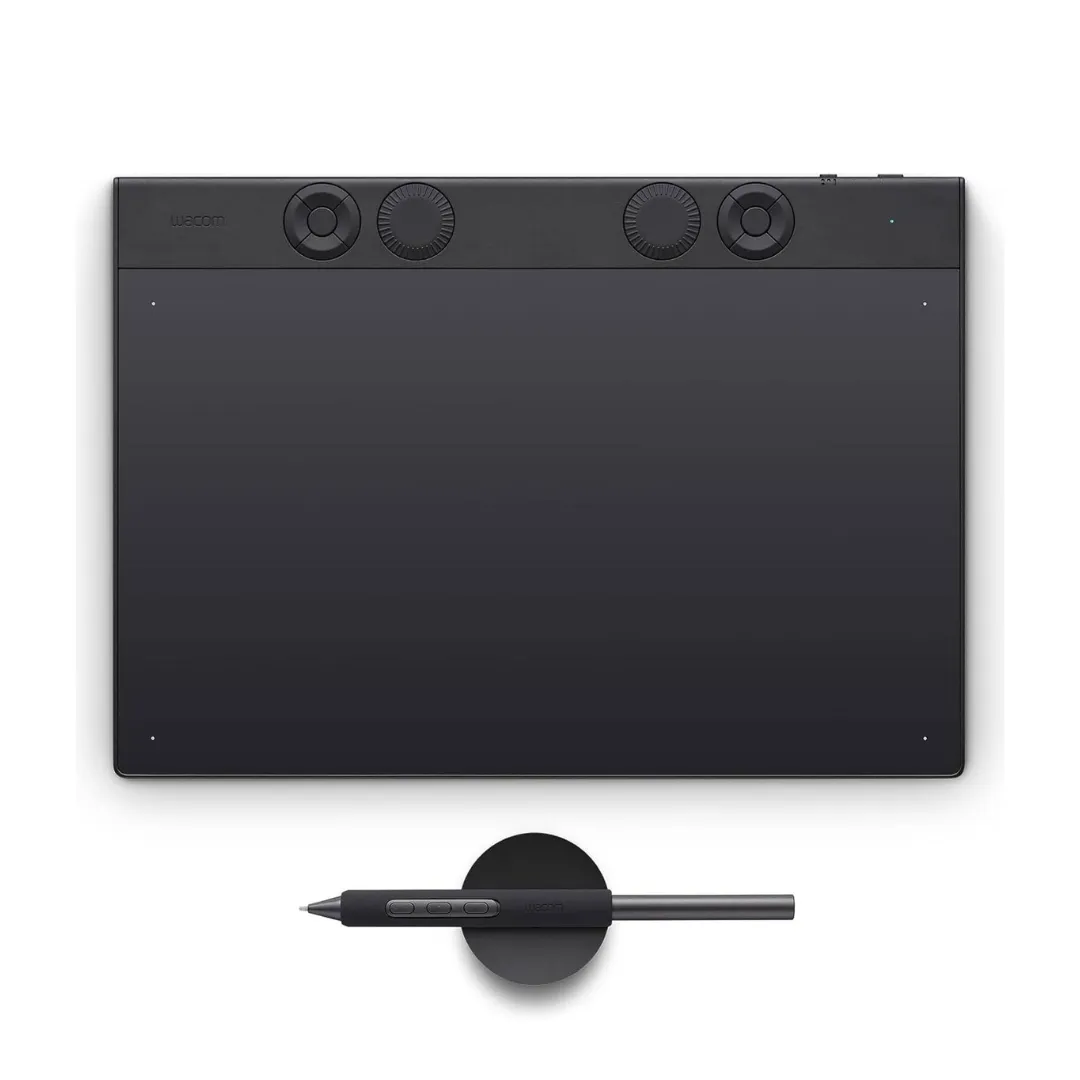
Wacom Intuos Pro : Small, Medium & Large Pen Tablets
This article covers everything a UAE or Middle East buyer needs to know before choosing the Wacom Intuos Pro — which size fits which workflow, what the core technology delivers, and where to source it with a regional warranty. By the end, you will know exactly which Intuos Pro configuration suits your studio, agency, or institution.
What Is the Wacom Intuos Pro?
The Wacom Intuos Pro is a professional pen tablet designed for illustrators, photographers, designers, and 3D artists who require high-precision pen input in their daily creative workflows. Manufactured by Wacom, the Intuos Pro is offered in three size configurations — Small, Medium, and Large — each powered by the same core pen technology. The 2025 generation introduces the Pro Pen 3, delivering 8,192 pressure levels and ±60° tilt recognition for professional-grade control.
Pro Pen 3: The Core Feature That Defines the Wacom Intuos Pro
The Pro Pen 3 is the defining technology of the Wacom Intuos Pro, providing pressure and tilt-sensitive input that directly influences line weight, brush opacity, and stroke texture in professional applications. For UAE studios managing client illustration, retouching, or concept art projects, this level of pen precision reduces correction cycles and improves deliverable quality.
The Pro Pen 3 is battery-free and cordless, which eliminates interruptions during intensive studio sessions. Users can also customise grip position and button configuration to match individual hand preferences — a practical detail for teams onboarding multiple artists.
Key Hardware Controls
The Wacom Intuos Pro pairs Pro Pen 3 precision with these hardware controls:
- 8,192 pressure levels for fine control over line weight and shading
- ±60° tilt recognition enabling natural brush angle replication
- 10 programmable ExpressKeys on Medium and Large models for shortcut access
- Radial dial controls for zoom, brush size, and layer navigation
- Multi-touch support for zoom, pan, and rotate gestures without keyboard input
- Customisable button configuration adaptable to individual creative workflows
Build and Design: Ultra-Slim Magnesium Body
The Wacom Intuos Pro is built with an ultra-slim magnesium body, making it both lightweight and structurally durable for daily studio use. This material choice directly benefits agencies and freelancers who transport their tablet between office, studio, and client locations.
The active area varies across the three size options, with each variant optimised for 16:9 display ratios. Users and professional communities consistently recognise the Intuos Pro’s build quality as premium relative to competing tablet categories — a finding consistent across multiple independent user reviews.
Connectivity: USB-C and Bluetooth 5.3
The Wacom Intuos Pro supports both USB-C wired and Bluetooth 5.3 wireless connectivity, giving studios the flexibility to adapt the tablet to fixed workstations or cable-free desk arrangements. This dual-mode approach is operationally useful for UAE procurement teams standardising devices across different workspace configurations.
Wireless battery life reaches approximately 16 hours on a single charge, model-dependent, which covers a full production day without interruption. The Intuos Pro is compatible with Windows, macOS, and Android, and integrates directly with Adobe Photoshop, Adobe Lightroom, Adobe Illustrator, Clip Studio Paint, Corel Painter, and Autodesk SketchBook. Community feedback notes that Bluetooth pairing can occasionally require troubleshooting when switching between systems or after driver updates — a consideration for IT teams managing multi-device environments.
Wacom Intuos Pro Sizes: Small, Medium, and Large Explained
Each Wacom Intuos Pro size uses identical Pro Pen 3 technology — the difference lies in active area and physical footprint, which determines suitability for different desk configurations and motion preferences.
- Intuos Pro Small: Compact and travel-friendly, suited to photographers and designers who work across multiple locations or operate in tight desk spaces.
- Intuos Pro Medium: The most widely recommended configuration for illustrators, retouchers, and designers working on single or dual monitors — it balances active area with desk footprint effectively.
- Intuos Pro Large: Offers the widest active area, preferred by artists who use full-arm gestures, work with large canvas formats, or manage dual-monitor setups in dedicated studio environments.
Who Should Buy the Wacom Intuos Pro in the UAE?
The Wacom Intuos Pro is built for professional and advanced creative users — not beginners exploring digital art for the first time. In the UAE and wider Middle East, this tablet is actively used across several industries:
- Digital art and illustration studios in Dubai and Abu Dhabi working on character design, environment art, and concept art benefit from the Pro Pen 3’s precision and the Large model’s expansive active area.
- Photo and video post-production teams handling retouching, colour grading, and visual effects rely on the pressure sensitivity to replicate natural brush control within Adobe Photoshop and Lightroom.
- Design agencies producing UI/UX, branding, and 3D sculpting work will find the Medium model’s balanced active area sufficient for most monitor configurations.
- Art schools, universities, and training centres across the GCC region can standardise on the Intuos Pro as a professional teaching tool — bundle options make institution-wide procurement practical.
- Freelancers who move between client sites will find the Small model’s portability and the full wireless capability of Bluetooth 5.3 particularly valuable.
Wacom Intuos Pro vs Wacom Intuos Pro Paper Edition
The Wacom Intuos Pro Paper Edition is an earlier variant that adds paper-feel workflow accessories for artists who want to sketch on physical paper and capture that input digitally. The current Intuos Pro generation with Pro Pen 3 is the more advanced option for purely digital workflows.
| Feature | Wacom Intuos Pro (2025 Gen) | Wacom Intuos Pro Paper Edition |
|---|---|---|
| Core Technology | Pro Pen 3 | Earlier pen generation |
| Pressure Levels | 8,192 | Not confirmed in research data |
| Body Material | Magnesium | Not confirmed in research data |
| Wireless | Bluetooth 5.3 | Not confirmed in research data |
| Connectivity | USB-C and Bluetooth 5.3 | Not confirmed in research data |
| Key Differentiator | Current generation pen precision and wireless performance | Paper-to-digital workflow with physical paper input accessories |
| Best For | Fully digital creative workflows | Artists who want to draw on paper and convert to digital |
The current Wacom Intuos Pro is the right choice for studios, agencies, and institutions where all creative work happens digitally and pen precision is the primary requirement. The Paper Edition addresses a specific niche — artists who prefer the feel of drawing on physical paper and want that input captured digitally — but it does not represent the current generation of Wacom’s pen and wireless technology.
User communities consistently highlight that buyers rarely need the Paper Edition unless the paper-to-digital workflow is a confirmed requirement. For most UAE professional environments, the current Intuos Pro generation delivers more capable hardware.
Choose the Wacom Intuos Pro (2025 Gen) if…
- Your entire workflow is digital and pen precision is the top priority
- You need Bluetooth 5.3 wireless performance and USB-C connectivity
- You are standardising devices across a studio, agency, or educational institution
- You want the latest Pro Pen 3 technology with full software compatibility
Choose the Wacom Intuos Pro Paper Edition if…
- You specifically require a paper-to-digital sketching workflow
- Your creative process starts on physical paper before moving to digital editing
- The paper-feel accessory set is a confirmed workflow requirement
What Is the Wacom Intuos Pro Price in UAE and Where Can You Buy It?
Pricing for the Wacom Intuos Pro varies by size configuration — Small, Medium, and Large are each priced differently, and bundle options for studios or educational institutions may carry separate terms. Pricing is available on request through wacomme.ae, along with current availability, bundle options, and full UAE warranty support.
wacomme.ae is a trusted Wacom dealer and supplier serving the UAE, KSA, Qatar, Kuwait, Oman, Bahrain, Egypt, Jordan, Lebanon, Iraq, and wider Middle East and African markets. All Intuos Pro models supplied through wacomme.ae include an official regional warranty.
Software and Integration
The Wacom Intuos Pro integrates natively with the most widely used creative platforms in UAE professional environments. This covers the full Adobe Creative Cloud suite relevant to creative work as well as specialist illustration and painting tools.
Confirmed compatible platforms include Adobe Photoshop, Adobe Lightroom, Adobe Illustrator, Clip Studio Paint, Corel Painter, and Autodesk SketchBook. Driver setup is handled through Wacom Center, which also manages ExpressKey mapping, pen sensitivity settings, and multi-touch configuration. Community feedback identifies driver updates and shortcut remapping as areas where new users may need initial support — wacomme.ae provides assistance with driver installation and Wacom Center configuration as part of its dealer service.
Frequently Asked Questions
What is the Wacom Intuos Pro price in UAE?
The Wacom Intuos Pro is available in Small, Medium, and Large configurations, each at a different price point. Exact pricing is available on request through wacomme.ae, which covers current UAE availability, bundle options, and regional warranty details.
Where can I buy the Wacom Intuos Pro in Dubai?
The Wacom Intuos Pro can be sourced through wacomme.ae, a dedicated Wacom dealer serving Dubai and the wider UAE market. wacomme.ae supplies all three size options — Small, Medium, and Large — with official regional warranty support.
Does the Wacom Intuos Pro come with UAE warranty?
Yes. The Wacom Intuos Pro supplied through wacomme.ae includes an official regional warranty covering the UAE and other Middle East markets. Buyers should confirm specific warranty terms and duration when placing their order.
Is the Wacom Intuos Pro better than the Wacom Intuos Pro Paper Edition?
The current Wacom Intuos Pro generation with Pro Pen 3 is the more advanced option for purely digital workflows, offering 8,192 pressure levels, Bluetooth 5.3, and USB-C connectivity. The Wacom Intuos Pro Paper Edition is an earlier variant suited specifically to artists who require a paper-to-digital sketching workflow. For most UAE professional studios and agencies, the current Intuos Pro generation is the stronger choice.
Which Wacom Intuos Pro size should I choose?
The Wacom Intuos Pro Small suits travel and compact desk environments. The Intuos Pro Medium is the most widely recommended size for illustrators, retouchers, and designers on standard desk setups. The Intuos Pro Large is preferred for artists who use full-arm gestures or work with dual-monitor configurations. wacomme.ae provides size selection advice based on your specific workflow and workspace.
What software does the Wacom Intuos Pro work with?
The Wacom Intuos Pro is confirmed compatible with Adobe Photoshop, Adobe Lightroom, Adobe Illustrator, Clip Studio Paint, Corel Painter, and Autodesk SketchBook. It also supports Windows, macOS, and Android operating systems, making it adaptable across most professional creative environments in the UAE.
Can the Wacom Intuos Pro be used wirelessly?
Yes. The Wacom Intuos Pro supports Bluetooth 5.3 wireless connectivity with up to approximately 16 hours of battery life on wireless use, model-dependent. It also connects via USB-C for wired operation, giving studios flexibility across different workspace configurations.
Wacom Intuos Pro: Overall Summary
The Wacom Intuos Pro is a professional pen tablet available in Small, Medium, and Large configurations, all powered by the Pro Pen 3 with 8,192 pressure levels and ±60° tilt recognition. Its strongest capability is delivering precise, pressure-sensitive pen input across demanding creative workflows including illustration, photo retouching, 3D sculpting, and animation. In the UAE market, the Intuos Pro is the appropriate choice for studios, agencies, educational institutions, and freelancers who require professional-grade pen performance with wireless flexibility. Buyers new to pen tablets should factor in a learning curve, and teams managing multi-device environments should plan for initial driver and Bluetooth configuration.