
Wacom sign pro PDF:
Wacom sign pro PDF is a desktop and mobile application that enables legally binding, handwritten electronic signatures on PDF documents — designed for UAE banks, clinics, government entities, and enterprises. This article explains how the software works, who it suits, and how it compares to the developer-focused Wacom Signature SDK so you can make a confident procurement decision.
What Is Wacom sign pro PDF?
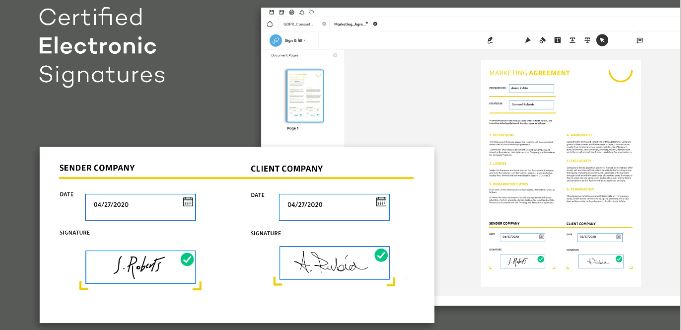
Wacom sign pro PDF is an electronic signature and PDF signing application developed by Wacom Co., Ltd., designed to digitise the handwritten signing experience across Windows desktop and Android mobile environments. The software captures signatures using Wacom EMR pens, stylus input, or finger touch, and embeds them directly into PDF documents with full security protections. Its core purpose is to replace paper-based signing workflows in high-trust environments such as banking, healthcare, and government services.
The application supports three primary functions: electronic handwritten signature capture, PDF annotation and mark-up, and PDF form filling via keyboard or handwriting recognition. This makes Wacom sign pro PDF a complete front-end signing tool rather than a narrow capture utility.
Biometric Signature Capture: The Core Strength
Wacom sign pro PDF differentiates itself from basic eSignature tools through biometric handwritten signature capture — collecting pen pressure, stroke speed, movement, and stroke characteristics when signed using compatible Wacom EMR hardware. This biometric data is embedded invisibly within the signed PDF, providing a richer evidence trail than a simple image-based signature. For UAE banks and healthcare providers, this strengthens the evidentiary value of each signed document in the event of a dispute or regulatory audit.
The software also supports touch-based signatures created with a finger or capacitive stylus on standard touchscreens, though these capture image data only and do not include biometric pen dynamics. Wacom sign pro PDF supports both modes within the same workflow, giving organisations flexibility when deploying across mixed hardware environments.
Wacom sign pro PDF delivers six signature and annotation capabilities that cover the full document signing lifecycle:
- Biometric handwritten signatures with pen pressure and stroke dynamics via Wacom EMR hardware
- Touch-based image signatures using finger or capacitive stylus on standard touchscreens
- Freehand annotations, sticky notes, and text mark-up including highlight, underline, and strikethrough
- PDF form filling via keyboard input or handwriting recognition on supported platforms
- Cryptographic hashing of signed PDFs aligned with ISO 32000 and PAdES standards
- Signature metadata embedding: signer identity, signing time, and signing reason within the PDF
Document Security and Offline Operation
Wacom sign pro PDF applies cryptographic hashing to every signed PDF so that any post-signing alteration to content or signatures is detectable. The software uses ISO-compatible signature formats aligned with the PDF Advanced Electronic Signatures (PAdES) standard, based on ISO 32000 and ETSI specifications for advanced electronic signatures in PDFs. This directly supports legal defensibility for contracts, consent forms, and government declarations in the UAE.
The application operates fully offline on both Windows and Android, meaning signing and annotation workflows continue without internet connectivity. This matters for UAE organisations with branch locations or field operations where network access is intermittent but document processing cannot pause.
Who Should Buy Wacom sign pro PDF in the UAE?
Wacom sign pro PDF is specifically suited to UAE organisations where handwritten signatures carry operational, legal, or cultural weight and where paper elimination is a business priority. The software is confirmed available in the UAE market and is in active use across several regulated industries.
The clearest buyer profiles for Wacom sign pro PDF in the UAE and wider GCC are:
- Banks and financial institutions in Dubai and Abu Dhabi handling account opening, KYC forms, loan agreements, and investment disclosures at service counters
- Hospitals and clinics requiring patient consent forms, registration documents, and insurance approval signatures in paper-free environments
- Government entities processing permits, licences, service applications, and public-facing declarations at service windows
- Corporate businesses managing contracts, NDAs, HR documentation, and purchase orders across distributed office locations
- Organisations already using Wacom signature pads such as the STU-430, STU-540, or DTU-1031AX at reception or service desks
Organisations that process documents in high volumes daily and need a credible biometric evidence trail — rather than a simple click-to-sign approach — will find Wacom sign pro PDF the more appropriate choice over generic eSignature platforms.
Wacom sign pro PDF vs Wacom Signature SDK: Which One Is Right for Your Use Case?
Wacom sign pro PDF and the Wacom Signature SDK both enable electronic handwritten signatures using Wacom hardware, but they serve fundamentally different roles in an organisation’s technology stack. Wacom sign pro PDF is a finished, deployable end-user application, while the Wacom Signature SDK is a developer toolkit for embedding signature capture into custom-built systems. Choosing between them depends on whether your organisation needs a ready-to-use tool or a programmable component for bespoke integration.
| Feature | Wacom sign pro PDF | Wacom Signature SDK |
|---|---|---|
| Product Type | Ready-to-use PDF signing application | Developer library and integration toolkit |
| Primary User | Business end-users and IT administrators deploying a finished app | Software developers and systems integrators |
| Core Technology | Biometric eSignature capture, PDF annotation, cryptographic locking | API and library-level signature capture for custom UI and workflow embedding |
| Key Differentiator | Standalone PDF workflow with user interface, offline operation, and PAdES-compliant output | Flexible integration into bespoke banking, healthcare, or government applications |
| Best For | Organisations needing fast deployment at service counters without custom development | Enterprises building custom eSignature flows into existing core banking or EMR systems |
| Connectivity | USB for Wacom STU pads and pen displays; Android file system and share targets | Integrated via Wacom SDKs into custom applications on multiple platforms |
| Licensing Target | IT departments and business procurement teams | Developer and integrator licensing for software projects |
| Document Format Handled | PDF input and output natively within the application | Format determined by the custom application being built around the SDK |
Wacom sign pro PDF is the right choice for organisations that need signing capability deployed immediately at branch counters or mobile devices, without committing development resources. Users consistently report reliable offline operation and accurate biometric capture on Wacom hardware, with strong integration at service desks as a recurring advantage. The credit-based licensing model can require monitoring at high volumes, but for most UAE branch environments, the ready-to-use deployment outweighs this consideration.
The Wacom Signature SDK suits UAE technology teams and solution integrators building bespoke signing flows inside existing core banking platforms, hospital EMR systems, or government portals. If your organisation needs signing embedded within a custom interface rather than a standalone PDF application, the SDK is the appropriate tool.
Choose Wacom sign pro PDF if…
- You need a deployable PDF signing solution without custom development
- Your staff sign documents at service counters using Wacom STU pads or pen displays
- You require biometric evidence capture and PAdES-compliant output from day one
- Offline operation across branches with intermittent connectivity is a requirement
Choose Wacom Signature SDK if…
- Your team is building a custom eSignature workflow inside an existing enterprise application
- You need programmatic control over the signing UI, data handling, and back-end integration
- Your use case involves embedding signatures into a core banking, EMR, or government portal system
What Is the Wacom sign pro PDF Price in UAE and Where Can You Buy It?
Wacom sign pro PDF is available in Standard, Trial, and Premium licensing modes. The Standard and Trial modes provide access at no cost with usage limitations, while the Premium licence unlocks the full feature set including watermark-free signed PDFs. The credit-based model means organisations can align licensing spend with actual daily signature volumes rather than paying flat per-seat fees regardless of usage.
Pricing for Wacom sign pro PDF Premium licences, Signature Set bundles combining hardware and software, and additional signature credits is available on request through wacomme.ae, along with current availability, bundle options, and full UAE warranty support. The Wacom sign pro PDF is confirmed available in the UAE market.
Software Integration and SDK Options
Wacom sign pro PDF integrates with Dropbox on Android via the system share mechanism, enabling field staff to open and save documents from cloud storage without a custom connector. Signed PDFs produced by the software can be opened and signature-validated in Adobe Acrobat and other PDF readers that support digital signature verification, making it compatible with standard document management review processes.
For deeper enterprise integration, Wacom sign pro PDF exposes an API, and Wacom provides the Wacom Signature SDK, STU SDK, and Device Kit for embedding signing capabilities into custom applications. Direct connectors to platforms such as SharePoint Online, Google Drive, or Box are not confirmed as native integrations; organisations requiring these connections will need custom development via the available SDKs.
Compliance and Regulatory Context in UAE
Wacom sign pro PDF captures and embeds biometric signature data — pen pressure, speed, and stroke characteristics — which constitutes personal data under Federal Decree-Law No. 45 of 2021 on the Protection of Personal Data (PDPL), the UAE’s primary personal data protection legislation. UAE organisations deploying Wacom sign pro PDF must ensure their data handling practices, storage policies, and consent processes for biometric data align with PDPL requirements.
The software’s use of PAdES (PDF Advanced Electronic Signatures) aligned with ISO 32000 and ETSI standards positions it within internationally recognised frameworks for advanced electronic signatures, which are relevant to regulatory acceptance in the UAE. Organisations deploying Wacom signing hardware alongside the software should also verify compliance with the Emirates Conformity Assessment Scheme (ECAS), overseen by the Emirates Authority for Standardization and Metrology (ESMA) and the Ministry of Industry and Advanced Technology, for regulated electronic devices used in UAE commercial environments.
Frequently Asked Questions
What is the Wacom sign pro PDF price in UAE?
Wacom sign pro PDF is available in free Standard and Trial modes, with Premium licensing available at a cost determined by signature credit volume and deployment scale. Pricing for Premium licences and Signature Set bundles is available on request through wacomme.ae. No specific price figures are published as these are tailored to organisational requirements.
Where can I buy Wacom sign pro PDF in Dubai?
Wacom sign pro PDF licences, including Premium and bundled Signature Sets combining Wacom hardware and software, are available through wacomme.ae, which serves the UAE market including Dubai and Abu Dhabi. wacomme.ae also provides advice on licensing mode selection and integration support for UAE deployments.
Does Wacom sign pro PDF come with UAE warranty support?
Warranty and after-sales support terms for Wacom sign pro PDF licences and associated Wacom hardware are available through wacomme.ae. Buyers should confirm current support coverage, including installation assistance and credit top-up processes, directly with wacomme.ae at the time of purchase.
Is Wacom sign pro PDF better than the Wacom Signature SDK?
Wacom sign pro PDF is a finished end-user PDF signing application, while the Wacom Signature SDK is a developer toolkit for embedding signature capture into custom-built systems — they are not direct alternatives but serve different roles. Wacom sign pro PDF is better for organisations that need immediate deployment without custom development; the Signature SDK suits teams building bespoke enterprise applications. Most UAE banks, clinics, and government service windows will find Wacom sign pro PDF the faster and more practical deployment path.
What is included in the box with Wacom sign pro PDF?
Wacom sign pro PDF is a software product; confirmed box contents for standalone software licences are not specified in available product data. When purchased as part of a Signature Set bundle — such as the STU-430-CH2 or STU-540-CH2 — the package includes the Wacom signature pad hardware alongside the software licence. Confirm exact bundle contents with wacomme.ae before ordering.
Does Wacom sign pro PDF work without internet?
Wacom sign pro PDF provides full signing and annotation functionality offline on both Windows and Android, requiring no internet connection to capture, embed, or save signed PDFs. This makes the software suitable for UAE branch environments and field operations where network connectivity is unreliable.
Which Wacom hardware works with Wacom sign pro PDF?
Wacom sign pro PDF is optimised for the STU-430, STU-540, and STU-541 signature pads, DTU-1031AX and DTU-1141B pen displays, DTK-2451 and DTH-2452 pen displays, and Intuos and Intuos Pro pen tablets. It also supports other pen-enabled Windows devices and touch screens for non-biometric signatures.
Wacom sign pro PDF: Overall Summary
Wacom sign pro PDF is a Windows and Android application from Wacom Co., Ltd. that enables biometric handwritten electronic signatures, PDF annotation, and secure document locking for enterprise use. Its strongest capability is the combination of biometric pen data capture — pressure, speed, and stroke dynamics — with PAdES-compliant cryptographic document protection, creating a defensible evidence trail suited to regulated UAE industries. The software is best deployed at bank branch counters.
sign pro PDF Enterprise API
Integrating a mobile signature solution into existing systems
sign pro PDF Enterprise API (Application Program Interface) for iOS and Android is available for enterprise users to integrate their existing system or application with the sign pro PDF Enterprise app to adopt a mobile electronic signature solution. This adds handwritten eSignatures, freehand form-input and annotation to documents.
Enterprise users in a variety of industries including banking and finance institutions, health-care organizations or the public sector, can utilize efficient, cost-effective and secure signature solutions in both an iOS and Android mobile environment.
When security is of the utmost importance, sign pro PDF Enterprise API integrates your existing system allowing for the capture of biometric signatures with the Wacom styli. Documents annotated with sign pro PDF can be edited across different OS before signing.
Due to the licensing model and the product features, sign pro PDF Enterprise API is scalable and can be adapted to growing organizations and a variable number of users.
Wacom Sign PRO PDF